| Week 1 | T&L Activities:Task 1 Planning a ProjectActivities |
| Task ID | Task Description | Assigned Staff | Duration | W1 D1 | W1 D2 | W1 D3 | W1 D4 | W1 D5 | W2 D1 | W2 D2 | W2 D3 | W2 D4 | W2 D5 | W3 D1 | W3 D2 | W3 D3 | W3 D4 | W3 D5 | Dependencies / Notes |
|---|---|---|---|---|---|---|---|---|---|---|---|---|---|---|---|---|---|---|---|
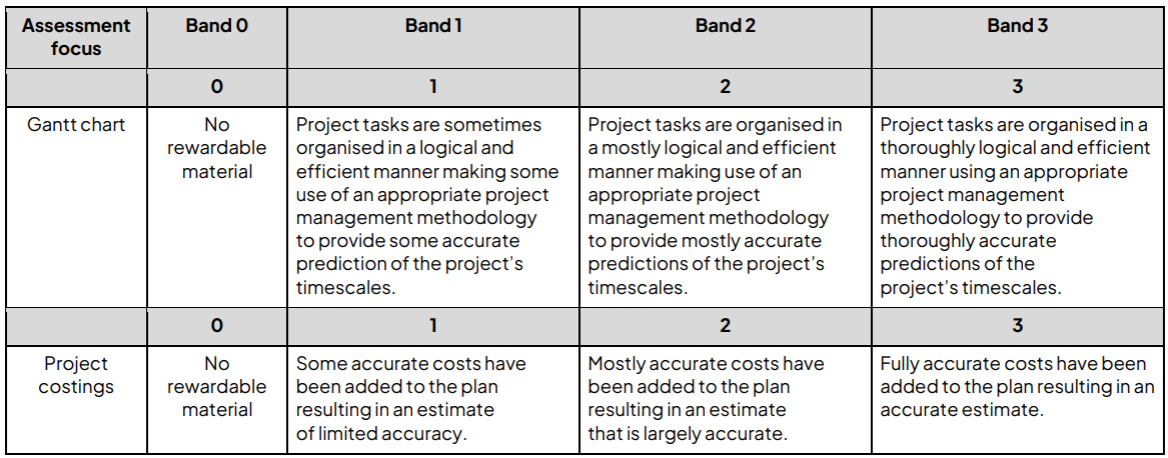
| 1 | Site Survey (Both Offices) | SNE + JNE1 | 1 day | 8 | Identify layout, risks, access points | ||||||||||||||
| 2 | Install Infrastructure (Office A) | JNE1 + JNE2 | 3 days | 8 | 8 | 8 | Cabling, switches, patch panels | ||||||||||||
| 3 | Install Infrastructure (Office B) | JNE1 + JNE2 | 3 days | 8 | 8 | 8 | Starts slightly delayed (risk mitigation) | ||||||||||||
| 4 | Initial Connectivity Test (Office A) | SNE | 1 day | 8 | Test before further installs | ||||||||||||||
| 5 | Initial Connectivity Test (Office B) | SNE | 1 day | 8 | Identify faults early | ||||||||||||||
| 6 | Fix Infrastructure Issues (A & B) | SNE + JNEs | 1 day | 8 | Early fault resolution | ||||||||||||||
| 7 | Server Installation & Setup | SNE | 2 days | Rack, OS install, RAID config | |||||||||||||||
| 8 | Configure Server Services (AD, DNS, DHCP) | SNE | 2 days | 8 | 8 | Dependency: server installed | |||||||||||||
| 9 | Network Configuration (IP, VLANs, Routing) | SNE | 2 days | 8 | 8 | Subnets, gateways, VLANs | |||||||||||||
| 10 | Wireless Setup (SSID, Security) | JNE1 | 1 day | 8 | WPA3, segmentation | ||||||||||||||
| 11 | Build PCs (Hardware Assembly) | JNE2 | 3 days | Parallel with infrastructure | |||||||||||||||
| 12 | Install OS & Software on PCs | JNE2 | 2 days | Office software, antivirus | |||||||||||||||
| 13 | Join PCs to Domain | JNE2 | 1 day | Requires AD active | |||||||||||||||
| 14 | Apply Security Policies | SNE | 1 day | Passwords, permissions | |||||||||||||||
| 15 | Mid-Project Testing (All Systems) | SNE + JNEs | 1 day | Ping, login, DNS tests | |||||||||||||||
| 16 | Fix Identified Issues | SNE + JNEs | 2 days | Iterative fixing | |||||||||||||||
| 17 | Full System Testing (End-to-End) | SNE | 1 day | Simulated real use | |||||||||||||||
| 18 | Regression Testing | JNE1 + JNE2 | 1 day | Both juniors (built-in contingency) | |||||||||||||||
| 19 | Final Fixes & Optimisation | SNE | 1 day | Minor issues resolved | |||||||||||||||
| 20 | User Account Creation & Permissions | JNE1 | 1 day | Role-based access | |||||||||||||||
| 21 | Security Enhancements (MFA, backups) | SNE | 1 day | Final hardening | |||||||||||||||
| 22 | Documentation & Handover | SNE + JNEs | 2 days | Network diagrams, guides | |||||||||||||||
| 23 | Final Review & Sign-off | Project Team | 1 day | Milestone completion |
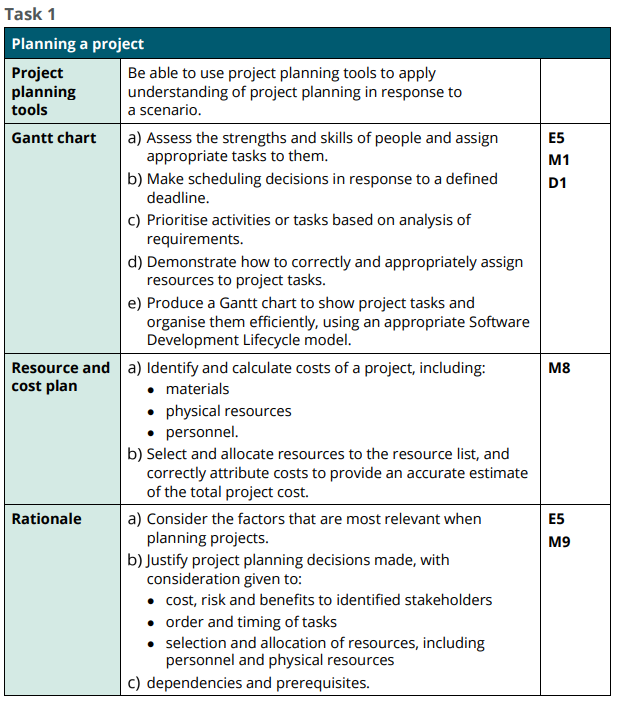
- Assess the strengths and skills of people and assign appropriate tasks to them.
- Make scheduling decisions in response to a defined deadline.
- Prioritise activities or tasks based on analysis of requirements.
- Demonstrate how to correctly and appropriately assign resources to project tasks.
- Use an appropriate project management methodology to efficiently organise project tasks.
Exam Guidance, Considerations and Tips
- There should be sensible use of concurrent and serial tasks; for example:
Infrastructure can be installed in both office spaces at the same time, but subsequent tasks may rely on single tasks, e.g. installing the infrastructure and server before accounts and security can be configured
- It would be sensible to test the connectivity BEFORE PCs are being installed; however, the plan could be organised to utilise the JNE to be building the PCs while the senior is testing and configuring.
- Tasks are relatively short so unlikely to break down further, but testing and fixing tests should be spread out between tasks, and at
sensible points.
- Expect some alignment of key milestones tasks and testing with fixing, e.g. it would be sensible to assume that a fault would be found when installing and testing the server and infrastructure, or minor faults found when building/configuring end user devices.
- There is no single correct way to organise the plan, but task orders should be sensible.
- Deadlines are not achievable if all tasks are done in a linear fashion; however, deadlines can be achieved quite comfortably with concurrent installation at each location.
- Depending on allocation of staff, some tasks could be over-allocated total hours (e.g. regression testing of a minor fault is 4 hours but could be doubled if allocated to both juniors – this could build in natural contingency and fail safes). Consideration of contingency, splitting of tasks in the sub-task/notes column of the plan
- Although some use of parallel tasks would be needed it may also be sensible to offset the start of the installation of one office space until the other is already under way. Adding a slight delay with mirrored tasks would help reduce issues further down the line, i.e. an issue that has occurred in one office could be pre-empted/mitigated as a solution may have already been found.
Resource and cost plan
What is a Resource and Cost Plan, why we need them, and, how to lay them out
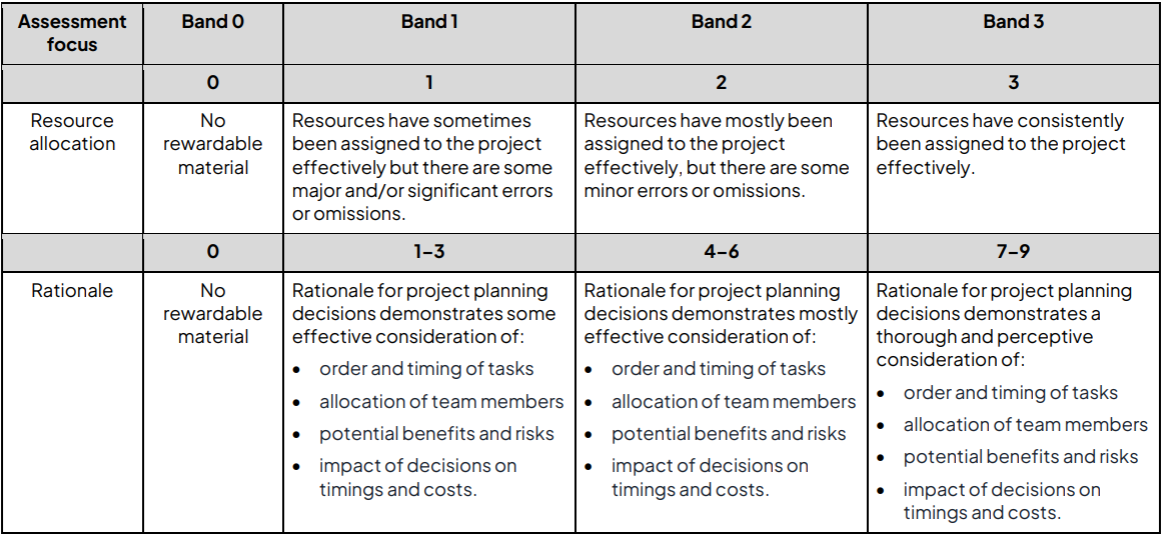
A resource and cost plan is a structured document used in project planning to identify, allocate, and calculate the resources required to complete a project, alongside the total financial cost of delivering it.
In the planning of a project you must identify human resources (staff), physical resources (hardware/devices), and associated costs (labour and equipment) to determine the feasibility and affordability of a solution .
A high-quality plan demonstrates not only accurate costing, but also justified decision-making, ensuring that staff are assigned appropriately based on skill level, equipment choices are suitable for the scenario, and the overall project reflects realistic constraints such as budgets, time, and operational requirements.
Resource and cost plans are used to:
- Ensure a project is financially viable, identifying whether it can realistically be delivered within budget
- Allocate resources efficiently, ensuring the right people and equipment are used in the right places
Identify and calculate costs of a project, including:
o materials
o physical resources
o personnel.
- Select and allocate resources to the resource list, and correctly attribute costs to provide an accurate estimate of the total project cost.
- Determine the affordability and viability of implementing a project and its impact on a company over time
Example of Human resources table of assets
| Staff Role | Staff Name | Daily Rate (£) |
|---|---|---|
| Senior Network Engineer (SNE) | Joe Bloggs | £35 |
| Junior Network Engineer (JNE1) | Anne Other | £20 |
| Junior Network Engineer (JNE2) | John Doe | £20 |
- Staff allocation- staff should be assigned based on task requirements, skills level and availability. There should be a clear rationale for who is assigned to which task.
- Cost of labour - students should calculate the total cost of labour based on hourly rates and the time each staff member is assigned to a task. Costs should be calculated using ONLY the number of days that were worked and NOT the total number of days of the project.
- Choice of server – students should indicate which of the servers they have chosen (this should also be detailed in their rationale). The calculations should show that they have chosen ONLY ONE of the servers.
- End user devices - students should detail the cost of which end user devices they have chosen PC/Laptop (or a combination).
- Total cost of project is approximate and depends on the allocation of staff, choice of server and choice of laptop/PC etc. Even choosing the cheaper options for server and end user devices, the project cannot be delivered within budget.
- Maintenance costs "
Rationale
What is a Rationale, why we need it, and how to lay it out
A rationale is a written explanation that justifies the decisions made within a project plan, showing clear reasoning for why specific approaches, task orders, resource allocations, and cost choices were selected. This part of the task looks to explain why the Gantt chart and resource/cost plan have been structured in a particular way, including consideration of task sequencing, staff allocation, risks, and financial decisions. A high-quality rationale demonstrates not just what has been planned, but the ability to think critically about efficiency, feasibility, and real-world IT practices, showing how the plan meets deadlines while managing risks and constraints.
A rationale is used to:
- Explain and justify your decisions, showing the examiner that your plan is logical and not random
- Demonstrate higher-level thinking, including awareness of risks, constraints, and alternative approaches
- Consider the factors that are most relevant when planning projects.
- Justify notable project planning decisions made (particularly those that will have a significant impact on the outcomes of the project), with consideration given to:
o order and timing of tasks
o allocation of team members
o potential benefits and risks
o impact of decisions on timings and costs.
The rationale will show reasoning for the chosen project development approach demonstrated in the project plan and points the students may consider, although some of these will vary depending on the choices students make in terms of organisation. These include but are not limited to:
• Task sequencing - students must justify the sequence of tasks, ensuring that all dependencies are considered. For example:
o installing the wireless access points before the main infrastructure and server wouldn’t be sensible. Also, the server would need to be in place before access and permissions were configured
o the reasoning behind choosing the order in which to update the offices and how/why they have organised the tasks to hit the deadline. For example, installing the infrastructure in both offices simultaneously with the SNE allocated to one office space and the juniors to another would make sense. While there is some risk with this, i.e. having the juniors work on a new install without direct supervision, they are all within the same building so the senior could support as needed. Adding a small amount of contingency time to allow for this would be sensible. Look for students to explore this.
• Risks - students must address potential risks in their planning, such as:
o the possibility of delays due to staff unavailability or unexpected network issues (have they allocated contingency time?)
o possible need to split the team so the installation could happen in both office spaces concurrently – causes issues as senior staff may not be able to oversee junior level workers
o Gwendolen Sandar – is very inexperienced so may need additional time and support
o Cledwyn Trumann – this is quite a hardware reliant project and they have only limited recent experience of physical infrastructure, which may lead to errors and/or delays
o Denise Wilkinson – inexperienced as a team leader so may not adequately support junior members of the team who will require support owing to their own inexperience. This could result in poor-quality outcomes.
• Cost justification - students must justify resource choices and associated costs including:
o opting for more/less expensive solutions (e.g. more expensive server as digital media and creative software are very resource intensive, desktops are cheaper and possibly better for the tasks at hand, but workers cannot move around/work remotely)
o allocation of staff hours – impact of doubling up staff and/or building in contingency time
o maintenance – how they predicted the cost of maintenance. Did they assume the minimum or maximum predicted number; what is the risk of it being outside of the allocated maintenance budget?
Files that support this week
Task 2
Diagnosing Issues and Providing Support
Marking
Indicative Content
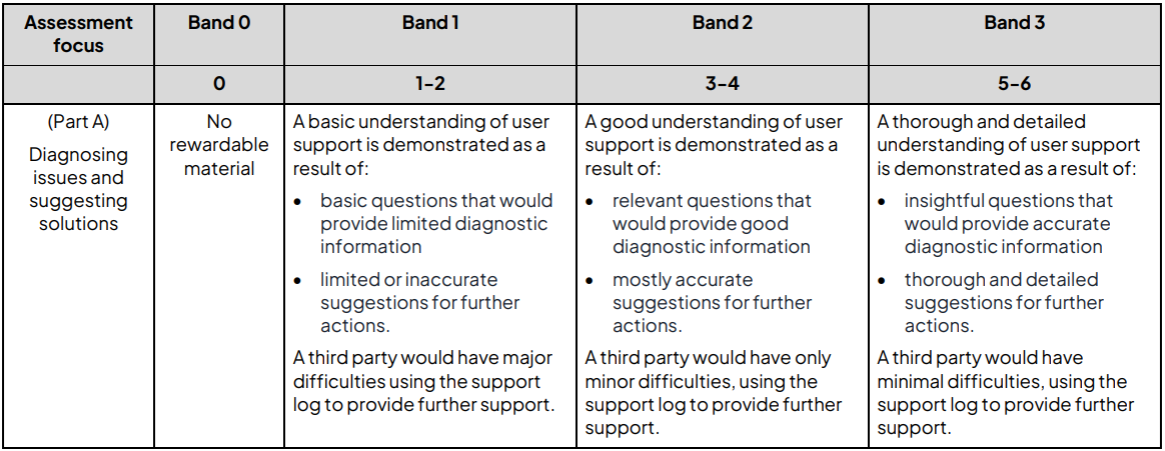
Assess the support tickets.
Apply and understating of testing and root cause analysis to identify potential causes and suggest a range of possible solutions.
Assess the simulated issues.
Carry out testing to identify the cause of the issues in the network and/or associated devices.
Perform any remedial actions required, justifying any decision made when fixing the defect.
Test Log
Marking
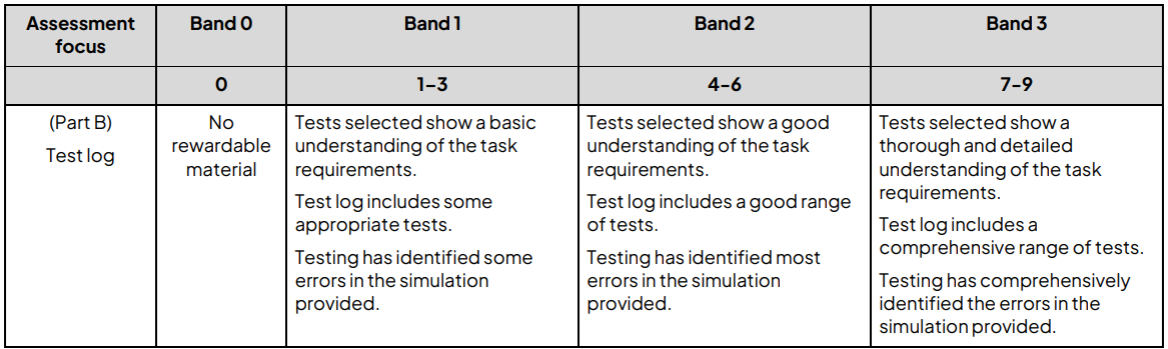
Indicative Content
Communicating the process E1 E4 M4 M8 D1 D2 D4
Identify potential causes for the issue raised by the support ticket.
Describe potential solutions that could be implemented.
The Simulation
Marking
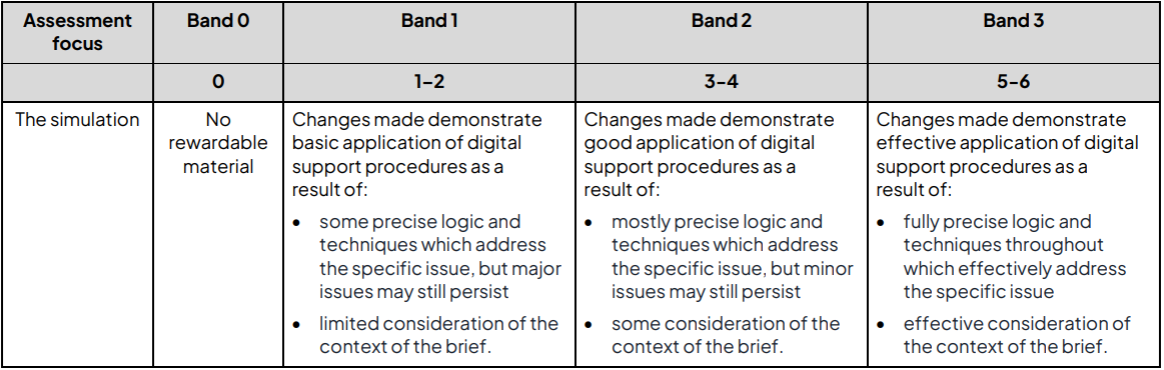
Indicative Content
The solution M4 M5 M7 D2 D4 D6
Provide annotated evidence of testing, including:
identifying tests to be carried out
describing the purpose of the identified test
identifying test data or tool to be used (e.g. ping, tracer, specific IP addresses)
describing the expected results
describing the actual results of the tests performed
comparing the actual results of testing with the expected results
describing any further actions that are required
refining the network/system as required
performing actions to fix the identified issue to ensure the simulated solutions work as expected.
Files that support this week
Task 3: Planning a solution
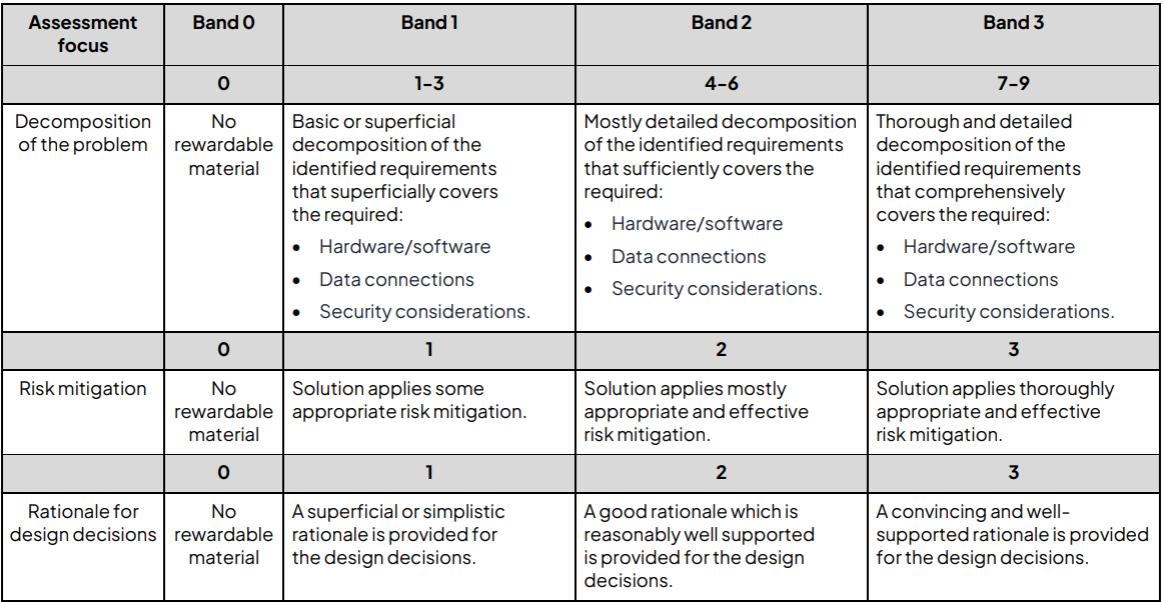
Decomposition of the problem E1 E2 E3 E4 E5 M1 M5 M6 D1 D2 D4
Apply an understating of decomposition to break down the situation down into smaller parts.
Use decomposition to ensure coverage of a wide range of suitable of general and specific needs of the organisation and its stakeholders.
Provide a detailed description of the hardware, software and data communication technologies that should be implemented to meet the identified requirements.
Risk mitigation M1 M4 D2
Assesses the potential risks to the organisation and its systems.
Suggest a range of measures that can be employed to mitigate the identified risks.
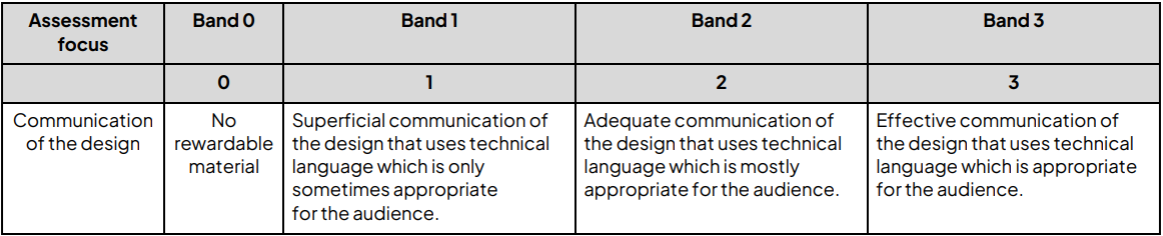
Communication of the solution E4 M1 D4
Ensure needs analysis is of sufficient detail to:
o effectively communicate the intended solution
o allow the client to make informed decisions
o allow a third party to use documents to create the proposed solution.
Communicate intended solution effectively and clearly, with use of:
o appropriate combination of written and diagrammatical presentation
o appropriate use of technical vocabulary
o consideration of audience
o explanations of processes and procedures to be implemented.
Files that support this week
Task 4a: Developing a solution
Marking
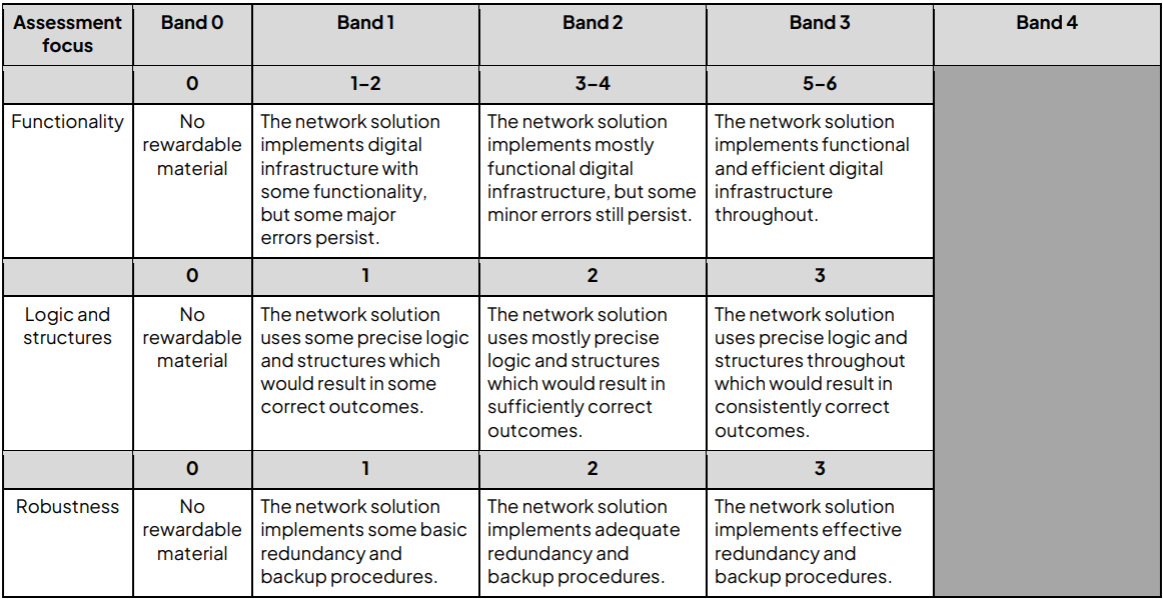
The solution E1 E5 M2 M4 M5 M6 M7 D1 D4 D6
Apply an undertaking of network infrastructure to develop a solution that meets the requirements of a brief, including:
refining and developing the given network simulation as required
selecting appropriate tools, devices and settings to meet the requirements
demonstrating an appropriate level of technical skill, and understanding of networks/hardware/software techniques and problem solving.
Robustness Ensure the network produced provides adequate levels of robustness for users and the given scenario including:
system resilience (e.g. user management, device/system hardening, segmentation)
redundancy (e.g. back-up systems and procedures, fall backs, UPS).
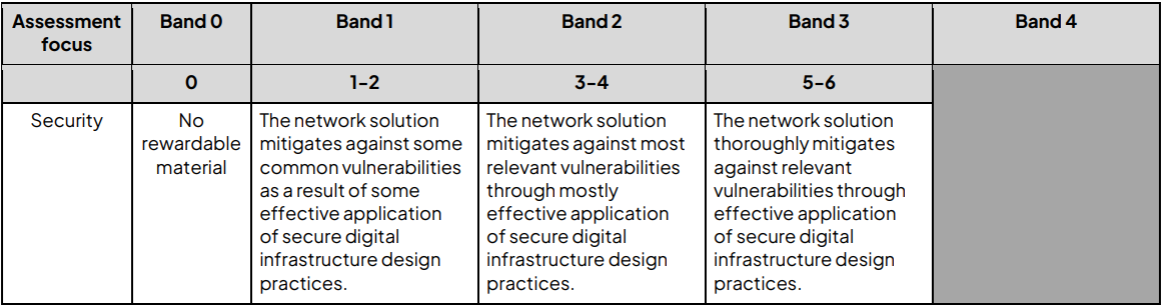
Security M6
Apply an understanding of network and system security including:
o configuring security software (e.g. anti-malware, firewalls)
o configuring user roles and network permissions
o hardening and air-gapping.
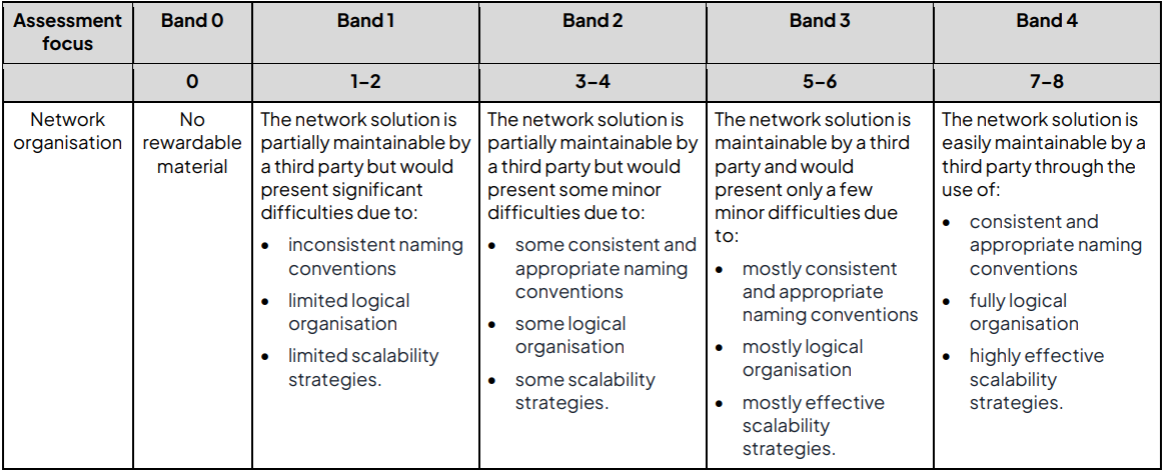
Organisation M4
Ensure network produced for the solution is appropriate to meet the demands of the brief, including:
use of networking knowledge including:
o configuring servers o configuring and deploying nodes on the network
o selection of appropriate connection media o selection and configuration of wired and wireless access to the network
o network regions/subnets.
knowledge of hardware/software including:
o configuring nodes on a hardware level (e.g. building a PC that meets specific requirements)
o installing and configuring software.
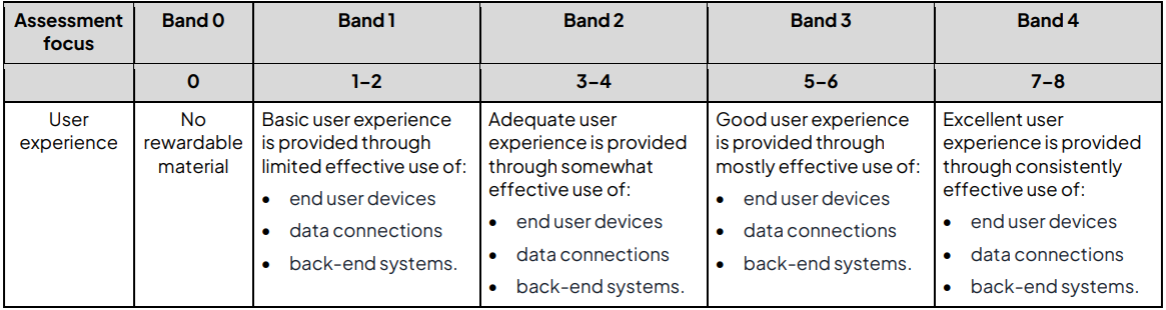
User experience E4
Meet user needs, with consideration and selection of:
end user devices
data connections
back-end systems
access and availability.
Task 4b: Reflective evaluation
Marking
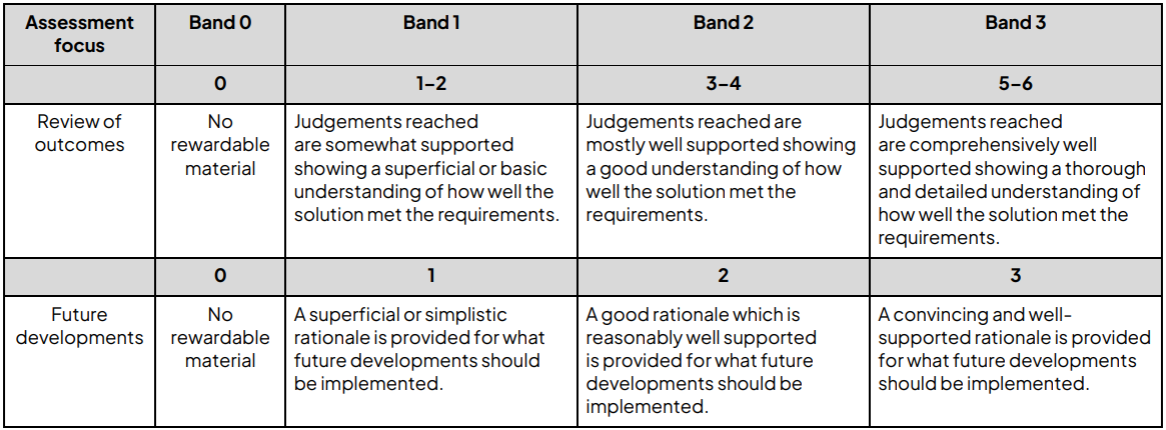
Review of outcomes E1 E2 E3 E4 D3
Be able to apply reflection and evaluation techniques.
Provide evidence that the product meets brief requirements:
o include measures against success criteria
o provide evidence that the product meets user needs
o discuss how it could be improved if the problem was revisited and given detailed consideration.
Files that support this week