| Week 1 | T&L Activities:
Exam Scenario and taskScenarioYou are working as an IT support technician for Willow Technology. Willow Technology is a digital marketing and design agency which currently operates from offices in Southampton and has recently opened a satellite office in York. Currently, as new members of staff join the business, computers are purchased ad hoc and joined to the network. There are a mixture of different operating systems and software in use throughout the business, and there are concerns about licensing and out-of-date software on each computer. For staff to be able to work effectively, they need access to word processing, spreadsheet and presentation software as well as an effective email client/calendaring solution and web browsing. Design staff require access to software that will allow image and video editing, document production and PDF editing. With the growth in the business, there is an urgent need to provide consistency of software to allow users to share documents easily and simplify support. It is also important that any computer needs to be up to date so that software can be installed. Computers need to be compatible with internet applications for moderate internet use. All installed software needs to be kept up to date as a matter of course. Following the office relocation and movement of equipment, one computer that has been relocated is now having connectivity issues when trying to access network resources. The computer has been brought to you for assistance and is now failing to boot at all. BriefAs part of your role, you are involved in both larger IT projects as well as providing immediate technical support diagnostics and assistance to technical issues experienced by end users. You are due to work on a major roll-out project but must make sure that individual issues are resolved as they are logged. You have been asked to investigate 2 helpdesk tasks relating to computer issues within the business, identifying and remedying the faults. Once you have resolved the individual issues, you will need to focus on the larger project and will need to research and propose an effective solution to ensure all company computers are running with a consistent operating system and software build that meets the different requirements of staff within the business. You should also plan and show how this will be rolled out to all users. Task 1: 2 hours 30 minutesYou must read the information on all pages provided for this task before starting your response. (22 marks) Scenario You are working with a colleague who is new to Willow Technology and you have been assigned 2 helpdesk tasks. The first helpdesk task requires you to troubleshoot and resolve the issue with computer 1. The user of the first computer has explained that they are trying to access the internet using the Google Chrome browser but keep getting the following message: This site can’t be reached. The web page at xxxxx might be temporarily down or it may have moved permanently to a new web address. The second helpdesk task requires you to support your colleague by undertaking a root cause analysis and then designing a test plan to propose changes so your colleague would be able to carry out the appropriate tests and check if the fault has been resolved with computer 2. The second computer is failing to boot at all and is only beeping when turned on. The computer is a Dell OptiPlex 5040 and when listening, you hear a sequence of 4 beeps, 3 beeps and then 1 beep. Instructions for studentsComputer 1 You have been provided with computer 1 and should investigate and identify the root cause of the connectivity issue. You should document your troubleshooting steps, identifying the issue and consider: - use of troubleshooting frameworks - tools used during the troubleshooting process Your troubleshooting document (6 marks) should include the following: - user details - test dates - proposed tests - expected outcomes of tests - ability to record changes based on test outcomes - record of diagnosis
Computer 2 Using the information in the scenario and the internet, you should identify the root cause of the hardware failure and propose a remedy. You should design a test plan that could be followed by your colleague to test that your proposed changes have resolved the fault. You are not required to undertake the tests. Your test plan (16 marks) should include the following: - user details - test dates - proposed tests - expected outcomes of tests - ability to record changes based on test outcomes - user acceptance of work completed
Evidence required for submission- a troubleshooting document in .pdf format - a test plan document in .pdf format When you have completed this task, you should save in a .pdf format, and name your file: Surname_Initial_student number_evidence reference for example
Files that support this week | English:
|
Assessment:
|
Learning Outcomes:
• Route core element 1: Business context • Route core element 3: Data • Route core element 6: Diversity and inclusion • Route core element 9: Planning • Route core element 12: Tools • Pathway core element 1: Careers within the digital support services sector • Pathway core element 2: Communication in digital support services |
Awarding Organisation Criteria:
GEC1, GEC2, GEC3, GEC4, GEC6, GMC10, GDC1, GDC2, GDC3, GDC4, GDC5 |
| Maths:
|
|||||
| Stretch and Challenge:
|
E&D / BV | ||||
| Homework / Extension:
|
ILT | ||||
| → | → | → | → | → | → |
| Week 2 | T&L Activities:
Task 2: 2 hours 10 minutesYou must read the information on all pages provided for this task before starting your response
| English:
|
Assessment:
|
Learning Outcomes:
|
Awarding Organisation Criteria:
|
| Maths:
|
|||||
| Stretch and Challenge:
|
E&D / BV | ||||
| Homework / Extension:
|
ILT | ||||
| → | → | → | → | → | → |
| Week 3 | T&L Activities:
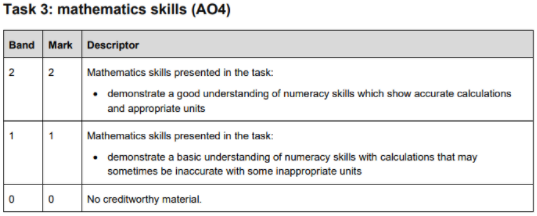
Task 3: 4 hoursYou must read the information on all pages provided for this task before starting your response (24 marks) Control document A: specification of requirementsControlled document to be issued at the start of task 3. Each user has been issued with a computer that was purchased at the time of joining the business and then added to the network. Each computer is currently using the anti-virus software that was supplied on the computer at point of purchase. There has been no policy to ensure anti-virus software has been updated and, in some incidences, the trial versions of anti-virus software have been allowed to expire. There is no centralised administration of the computers with each user having administrative access to their own computer. Administrators currently ask users for their passwords when supporting their computer. Desktop computers The desktop computers at the company include:
Laptop computers The laptop computers at the company include:
Current issues The current issues in the company include:
Requirements The requirements are:
Staffing The company currently has 52 staff working in the following roles:
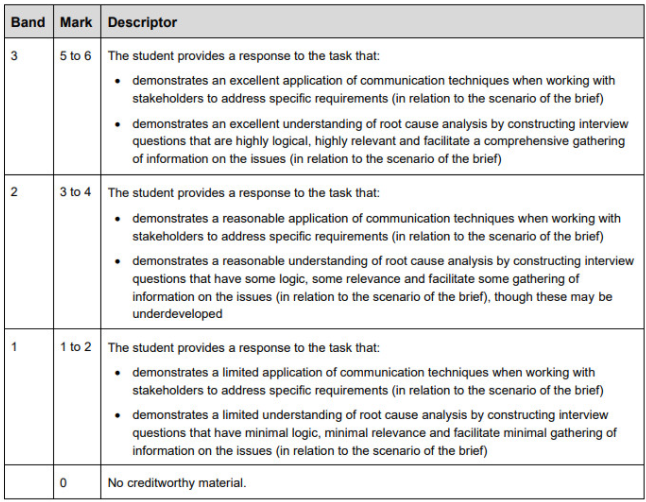
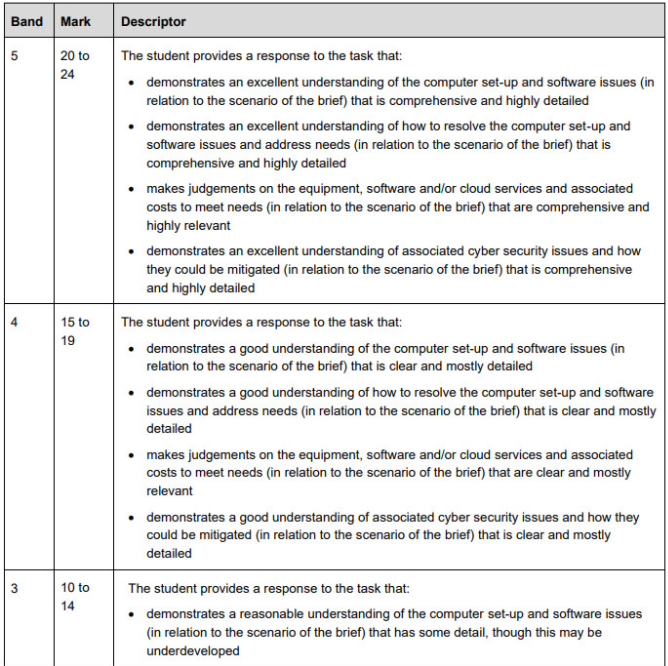
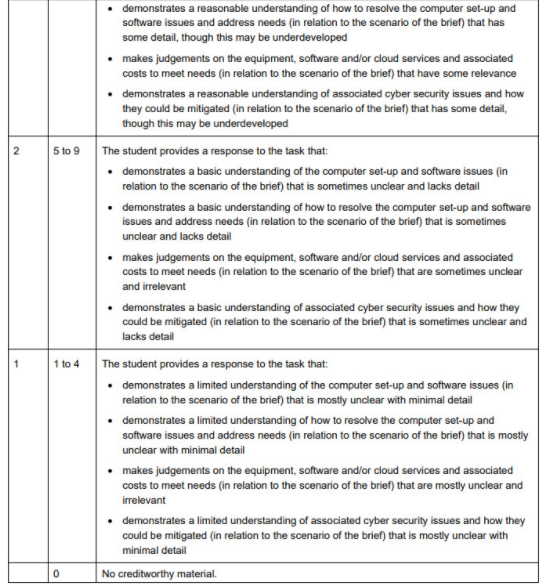
ScenarioFollowing your meeting with the network manager, you have been provided with a full specification of requirements (control document A) for the updated software build for company computers by your team leader (technical audience). Your team leader has asked you to assess the specification of requirements and prepare a project proposal that addresses the needs of the client. Instructions for students Your project proposal (24 marks) should include:
When identifying costs, the company usually uses PC World Business and Dell as preferred suppliers. Where possible, these suppliers should be used for all equipment or software recommendations before considering other suppliers. How is it Marked?
Evidence required for submission to NCFE
When you have completed this task, you should save in a .pdf format, and name your file: Surname_Initial_student number_evidence reference for example Smith_J_123456789_Task3 Additional guidanceYou will be issued with control document A for this task. This task will also assess your English skills. This task will also assess your mathematical skills which are worth 2 marks. You will have access to a word processing application or other suitable software to enable you to complete this task. Access to the internet is permitted. Access to any online cloud storage is not permitted. Use of online chat or emails is not permitted. Access to previous class notes/teaching materials is not permitted. You are permitted to have up to a maximum of 15 minutes rest break during this task. This must be supervised. Files that support this week | English:
|
Assessment:
|
Learning Outcomes:
|
Awarding Organisation Criteria:
|
| Maths:
|
|||||
| Stretch and Challenge:
|
E&D / BV | ||||
| Homework / Extension:
|
ILT | ||||
| → | → | → | → | → | → |
| Week 4 | T&L Activities:
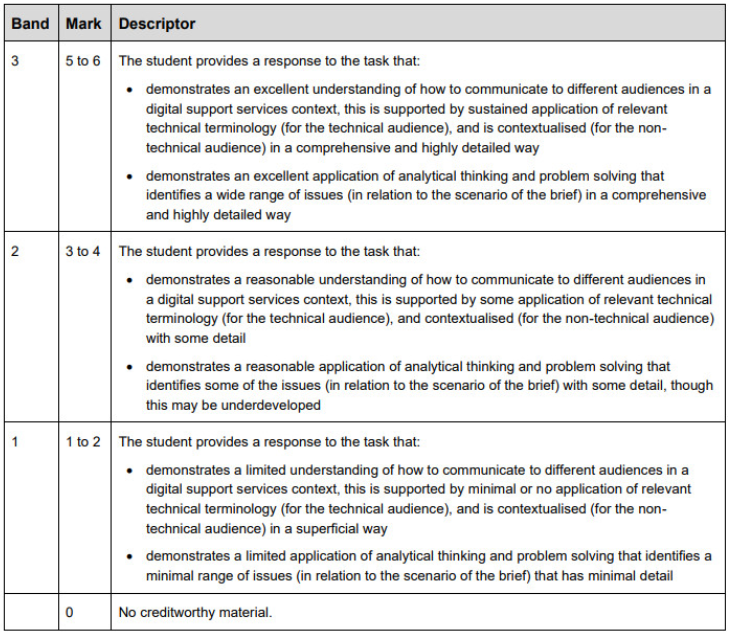
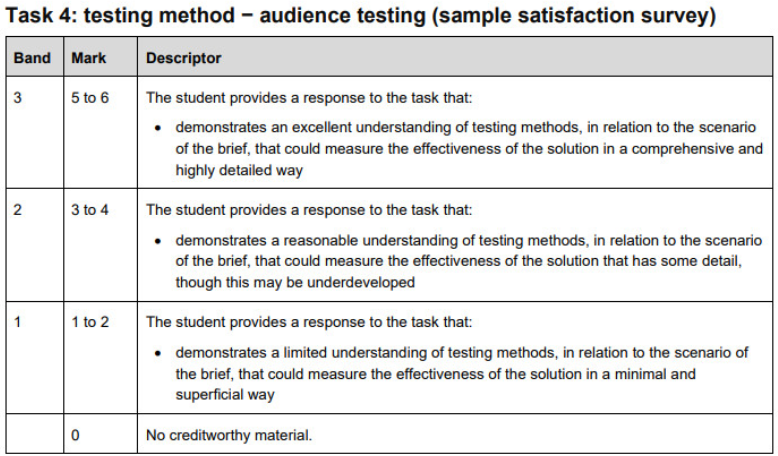
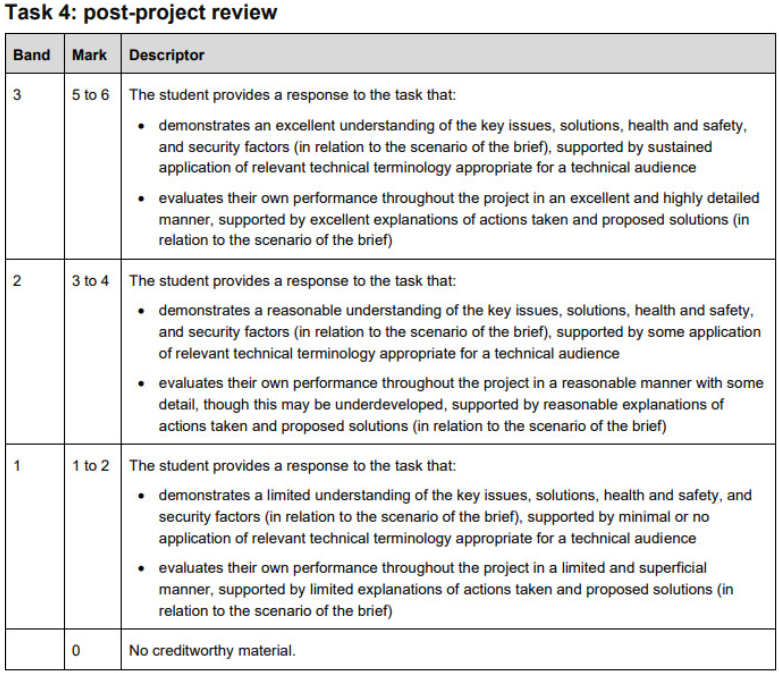
Task 4: 3 hours 30 minutesYou must read the information on all pages provided for this task before starting your response. (12 marks) ScenarioThe computer and software upgrade project is nearing its completion and Willow Technology are considering implementing your proposals. Your team leader (technical audience) wants you to prepare for a post-project review and create a sample satisfaction survey that could be used to test end-users’ satisfaction and measure if your solution fulfils the desired outcomes. Instructions for students
Your post-project review (6 marks) should include:
a post-project review document in .pdf format When you have completed this task, you should save in a .pdf format, and name your file: Surname_Initial_student number_evidence reference for example Smith_J_123456789_Task4 Additional guidanceThis task will also assess your English skills. You will have access to a word processing application or other suitable software to enable you to complete this task. You will have access to all of your completed ESP tasks for this task apart from the interview audio recording. Access to the internet is permitted. Access to any online cloud storage is not permitted. Use of online chat or emails is not permitted Access to previous class notes/teaching materials is not permitted. You are permitted to have up to a maximum of 15 minutes rest break during this task. This must be supervised.
How is it Marked?
Files that support this week | English:
|
Assessment:
|
Learning Outcomes:
|
Awarding Organisation Criteria:
|
| Maths:
|
|||||
| Stretch and Challenge:
|
E&D / BV | ||||
| Homework / Extension:
|
ILT | ||||
| → | → | → | → | → | → |