Top
Week 1
Learning Aims and Objectives:
Aim:
In this week's page, students will learn how key UK legislation protects employees, individuals, organisations and digital systems, and how these legal requirements apply within digital support environments.
Objectives:
1.By the end of this week's page students will be able to explain the key requirements of health and safety legislation, including the Health and Safety at Work Act, Manual Handling Operations, Work at Height Regulations and Display Screen Equipment regulations.
2.By the end of the week's page students will be able to identify common health and safety risks associated with working with digital systems, including display screen use, working at height, cable installation and manual handling.
3. By the end of the week's page students will be able to describe appropriate preventative measures used to reduce workplace risks, including training, safe working practices, suitable equipment, information, instruction and supervision.
4. By the end of the week's page students will be able to explain how UK data protection legislation affects individuals and organisations, including the principles used to ensure personal data is collected, processed, stored and protected appropriately.
5. By the end of the week's page students will be able to explain the purpose and key principles of the Computer Misuse Act 1990, including unauthorised access, computer misuse offences and the possible consequences of breaking the law.
4.1 Legislation
4.1.1 Understand the key points and implications to employers of the relevant health and safety legislation:
Health and Safety at Work Act:
The health and safety at work regulations that are currently in place within the UK is held in high regard globally as legislation, to the point that other countries use this legislation as a benchmark for their own.
Created in 1974 the regulation was created as a result of a significant amount of harm and death related to employees undertaking their work roles and responsibilities. The government established a group of people chaired by Lord Robens to create a report on safety and health at work. Lord Robens was tasked to create legislation that fit all business types regardless of size, from self-employed to large organisations.
https://web.archive.org/web/20200905174148/https://www.youtube.com/watch?v=rvZHYvmWaDs
o key points:
– provide a safe working environment
– ensure staff are properly trained
– adequate welfare provision
– provide relevant information, instruction and supervision
You have been tasked with creating an engaging activity for 16-18 year olds on the Health and Safety at Work etc Act 1974, specifically linked to the digital support services sector. This activity should last 10-15 minutes and involve both a learning element and interactive participation.
Your activity can be create in any type of application to enable the interactivity, this could be in scratch, Contruct 3, Wayfinder, Kahoot, GimKit or any other. This needs to be fun and entertaining for the targeted audiences. Examples of previous student work can be seen using the link below.
The Health Inspector on Scratch
You have been tasked with creating an informative presentation that includes examples and casestudies of the Health and Safety at work Act.
Activity Title: Ensuring Safety in the Digital Support Workspace
Objective:
By the end of the activity, you will understand key aspects of the Health and Safety at Work etc Act 1974 and how they apply to the digital support services sector. You will explore real-world examples from a well-known organisation and propose solutions to common safety challenges.
Materials Needed:
• Access to a computer or tablet with internet for research
• Whiteboard or flipchart for note-taking (optional for classroom setting)
• Handouts summarising the Health and Safety at Work etc Act 1974 (optional)
Step-by-Step Activity Plan:
1. Introduction (5 minutes)
Briefly explain the key points of the Health and Safety at Work etc Act 1974, focusing on its relevance to the digital support services sector. Highlight the importance of both physical safety (e.g., ergonomic workspaces) and mental health (e.g., managing stress in a high-demand environment).
Example:
“The Act is designed to ensure that employers provide a safe working environment for their employees. In digital support services, this can include everything from making sure workers have the right equipment to prevent injuries, to ensuring their mental health is supported during busy periods.”
2. Group Research (10 minutes)
Split into small groups and research how a well-known organisation, such as Google, applies health and safety measures within its digital support teams. Focus on aspects such as:
• Ergonomics (adjustable desks, chairs, screen positioning)
• Mental health support (stress management, mental health days)
• Work-from-home health policies (safe home office setup, guidance on screen time)
• Emergency procedures (fire drills, reporting unsafe working conditions)
Each group should use available resources (e.g., company blogs, news articles, or health and safety documentation) to identify 2-3 safety measures that Google has implemented.
3. Group Presentations (5-10 minutes)
After the research phase, each group will present their findings, focusing on how these health and safety measures align with the Health and Safety at Work etc Act 1974.
Example Presentation:
“Google has implemented several health and safety measures that align with the 1974 Act. They provide adjustable workstations to prevent physical strain, offer counselling services to employees, and ensure that staff working remotely are supported with proper ergonomic advice.”
4. Interactive Discussion (5-10 minutes)
Group discussion what additional ways digital support teams can improve health and safety practices. Focus your conversation on areas like managing prolonged screen time, dealing with high-stress situations, and ensuring safety for remote workers.
Example Question:
“If you were managing a digital support team at Google, what other safety measures would you put in place to ensure your team’s well-being?”
5. Conclusion (2-5 minutes)
Summarise the key points discussed, emphasising how the Health and Safety at Work etc Act 1974 protects employees in the digital support services sector. Reinforce the importance of both physical and mental health in the workplace and think about these issues as you enter your future careers.
By engaging in this activity, you will have applied theoretical knowledge of the Health and Safety at Work etc Act 1974 to real-world examples from a major organisation, thinking critically about health and safety in a sector you may enter in the future.
Manual handling operations:
o key points:
– avoid hazardous manual handling operations as far as possible
– assess any hazardous manual handling operations
– provide information on load and centre of gravity
– reduce the risk of injury so far as is reasonably practicable
Work at height regulations:
The regulations around "working at height 2005" play a very important part when linked to the installation of possible network infrastructure as placing equipment such as network access points (APs), Wi-Fi hubs and physical network cabling. These elements of a network can be located in ceilings and overhead gantries that require access to be done using ladders and in some situations scissor lifts called cherry pickers. As a result, the legislation is designed to ensure that employees are protected when undertaking any activities associated to accessing this equipment. The legislation requires that any employer ensure appropriate precautions are in place to reduce any possible injury, such as falling from height.
The Legislation and regulation ensure that the employee understands their duty to protect its employees by;
Ensuring that the equipment they are using or provided with is suitable for the job being undertaken, that it is strong enough for the task in hand, and that it is regularly checked for integrity and maintenance.
Appropriate training has been provided to ensure that the employees don't act in a way that could lead to harm to them or others, such as overreaching.
Provide the employees and potential members of the public with protection that reduces their being hit by falling materials.
Identifying Work at Height Risks in a Digital Support Environment
Objective:
You will develop an understanding of the Work at Height Regulations 2005 and apply them in the context of digital support services, specifically in identifying risks when dealing with cabling, server racks, and other equipment maintenance that may involve working at height.
Duration: 10-15 minutes
Materials Needed:
• Notepad or digital device for note-taking
• Floor plan or basic map of the educational environment (optional)
Instructions:
1. Introduction (2 minutes):
You will be briefly introduced to the Work at Height Regulations 2005, which are laws designed to prevent injuries and accidents when working at height. Examples could include accessing high server racks, cable installations, or fixing projectors.
2. Task Explanation (3 minutes):
You will be tasked with identifying potential risks associated with working at height within your current educational environment (e.g., IT support office, classroom, or server room). You will leave the classroom and observe locations where digital equipment maintenance may require working at height.
3. Activity (5 minutes):
You will walk around the educational environment and find at least two locations where work at height might occur. Consider:
• Where a ladder or steps would be needed (e.g., adjusting a ceiling-mounted projector, accessing cabling on high walls or ceiling panels).
• Whether there are secure, safe means to access the area.
• Any hazards like unstable surfaces, improper equipment, or inadequate protective measures.
4. Example Scenario:
You might observe the server room, where the top shelf of a rack is used for critical hardware. You should note that reaching this level requires the use of steps or a ladder, and you should evaluate whether proper equipment is in place to access the height safely (e.g., if the ladder is sturdy, if there are railings, and if the space is clear of obstructions).
5. Reflection & Discussion (5 minutes):
Once you return, you will share your observations. You will describe one risk you identified and suggest how it could be mitigated in line with the Work at Height Regulations 2005 (e.g., use of secure ladders, ensuring no tripping hazards below the workspace, using harnesses if necessary).
Expected Output Example:
You might report:
“In the server room, the top shelf of the rack requires a ladder to reach. The ladder present was sturdy but positioned on uneven flooring, which could cause instability. To comply with the Work at Height Regulations 2005, the ladder should be moved to a flat surface or a platform should be used to ensure stability before accessing the top shelf.”
This activity should encourage you to recognise the importance of safety when working at height in digital support roles and to think critically about how to mitigate risks in your surroundings.
o key points:
– make sure the work is properly planned, supervised and carried out by competent people
– do as much work as possible from the ground
– ensure workers can get safely to and from where they work at height
– ensure equipment is suitable, stable and strong enough for the job
– provide protection from falling objects
– consider emergency evacuation rescue procedures
Display screen equipment:
o implications to employers:
– conduct a display screen equipment workstation assessment
– reduce risks including making sure workers take breaks from display screen equipment work
– provide an eye test if an employee asks for one
– provide training and information for employees.
Have you ever had neck pain after a long gaming session or after doing work on a computer, or, found that your eyes have gotten tired and sore after looking at screens all day? This is where the Health and Safety (Display Screen Equipment) Regulations 1992 come in. This regulation is designed to protect users who continually use display screens for a long period.
Some of the key principles of the regulations to keep you safe when using computers, laptops, and tablets for extended periods are:
-
Adequate Training: Just like learning the controls in a game, employers need to train staff on using screens safely. This could involve learning proper posture, taking breaks, and adjusting screen settings to avoid eye strain.
-
Adequate Welfare Provision: Imagine getting a health boost after defeating a boss! Employers need to provide breaks for staff to move around, stretch, and rest their eyes. This could be short breaks every hour or longer breaks throughout the day.
-
Safe Working Environment: Wouldn't it be annoying to fight enemies in a dark, cramped cave? Similarly, the regulations ensure a safe working environment for screen users. This includes proper lighting, comfortable seating, and avoiding glare on the screen. Imagine a well-lit gaming setup with an ergonomic chair – that's what they're aiming for!
-
Suitable Information, Instruction & Supervision: Every good game has a handy guide, right? Employers need to provide staff with clear information on how to use screens safely. This could be posters, online resources, or even talks from health and safety experts. IT support can also play a role by helping set up screens and suggesting ergonomic adjustments.
5-Minute Challenge: In Pairs assess your computer setup for 5 minutes. Here's what to check:
Posture: Are you sitting up straight with your back supported?
Screen Distance: Is the screen an arm's length away?
Lighting: Is there any glare on the screen?
Breaks: Do you take breaks to move around and rest your eyes?
Discuss any improvements you can make and how you can work with your tutor to create a screen-safe environment.
Now that you have reflected on your own work areas use the government checklist (provided using the button below) to see what is expected of an employer for thier employees.
Display screen equipment (DSE) workstation checklist
Create a poster that uses terminology and images that a 16 year old might use to inform them of the DSE legislation of 1992. Using images in your poster will support your information and explainations, ensure that any images are referenced and attributed.
4.1.2 Understand the health and safety risks and preventative measures of working with digital systems:
Possible risks
Using display screen equipment
Musculoskeletal Disorders (MSDs): Poor posture and a poorly designed workstation can cause pain and disorders in the neck, shoulders, back, arms, wrists, and hands. This includes conditions such as repetitive strain injury (RSI).
Eye Strain and Visual Problems: Extended screen use can cause tired eyes, discomfort, temporary blurred vision, dry eyes, and headaches, a condition known as Computer Vision Syndrome (CVS). It does not cause permanent eye damage but can highlight pre-existing vision problems.
Fatigue and Stress: Long periods of static work, intense concentration, or poorly designed software/work organisation can lead to general physical and mental fatigue, and stress.
Working at heights
Falls from height: Distraction caused by looking at a screen or interacting with a digital device (tablet, phone, laptop) can lead to a loss of balance, misstep, or a failure to notice an edge or opening, resulting in a fall.
Falling objects: Digital devices and their accessories (batteries, styluses) can be dropped, posing a serious injury risk to people and damage to equipment below.
Manual handling issues: Carrying digital devices, especially with accessories (stands, spare batteries, etc.), to and from elevated work areas can increase manual handling strain, particularly if safe access is limited
Cable installation (ground level, onto walls)
Electric Shock and Burns: The primary hazard from contact with live wires or damaged cables, which can cause severe injury or death.
Arc Flash and Explosions: Damage to underground or in-wall cables can cause an explosion and intense flash, leading to severe burns.
Slips, Trips, and Falls: Trailing cables at ground level are a significant tripping hazard in the workplace, leading to potential injuries, additional to working at any height on a ladder.
Mechanical Damage: Cables are vulnerable to damage from sharp objects, crushing, or excessive pulling/bending during installation, which can compromise their integrity and create electrical or fire hazards.
Fire Hazards: Faulty wiring, overloaded circuits, or damaged equipment can lead to fires.
Ergonomic Risks: Improper manual handling of heavy cable spools can lead to musculoskeletal injuries.
Eye Injuries: Fiber optic cables pose a risk of eye injury from the light they carry, requiring appropriate eye protection.
Manual handling
Musculoskeletal Disorders (MSDs): The primary risk is developing MSDs, which include pain and disorders in the neck, shoulders, back, arms, wrists, and hands.
Work-Related Upper Limb Disorders (WRULDs) / Repetitive Strain Injury (RSI): Prolonged, uninterrupted work with a keyboard and mouse, or use of handheld devices (like PDAs and smartphones) with poor posture, can lead to these overuse injuries.
Back Pain: Incorrect seating, inadequate back support, and improper lifting techniques are major causes of chronic back pain.
Fatigue: Maintaining the same position for extended periods, or working with excessive workloads, can cause muscle fatigue and strain.
Injuries from Transporting Equipment: Carrying heavy or unbalanced loads (e.g., a laptop in a single-shoulder bag) can strain muscles and joints.
Accidents: Obstructions in the work area, poor lighting, or unstable flooring when moving equipment can lead to trips, slips, and falls.
Health and safety requirements
Methods of mitigating risk:
Adequate training
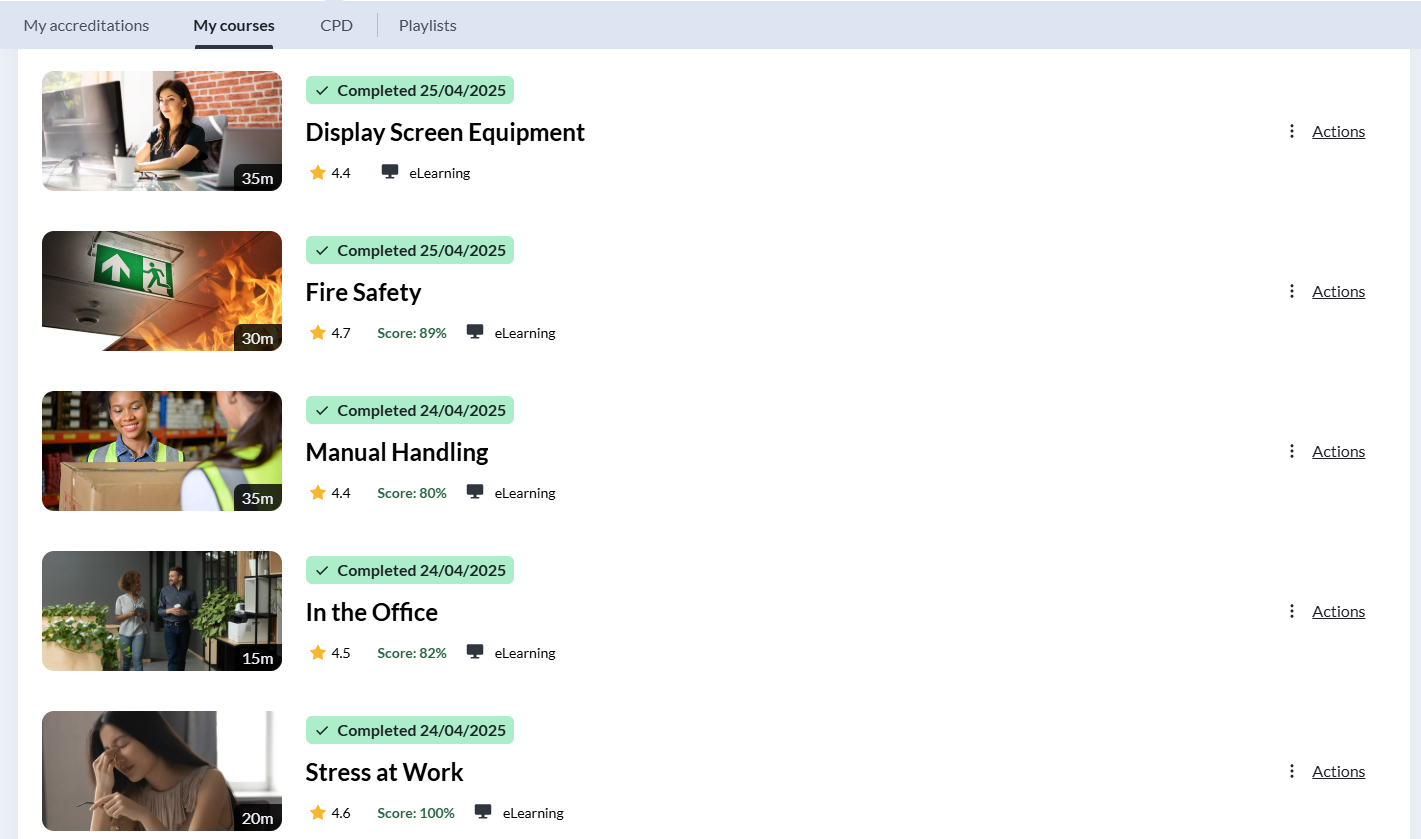
For any organisation, it is vital to ensure that the workforce has the appropriate training, skills, and knowledge to carry out their duties and responsibilities effectively, competently, and most importantly, safely. Adequate training helps to reduce the risk of human error, ensures compliance with organisational policies and legal requirements, and supports a consistent standard of working practice across the organisation.
Many organisations now utilise e-learning platforms as a primary method of delivering training and sharing essential knowledge with employees. E-learning enables staff to access training materials at a time and pace that suits their individual learning needs, promoting flexibility and inclusivity within the workforce. In addition, digital training platforms allow organisations to deliver consistent, up-to-date content, track learner progress, and maintain accurate records of completed training for audit and compliance purposes. This approach not only supports ongoing professional development but also contributes to improved efficiency, reduced training costs, and a safer working environment.
Safe working environment

Suitable provision of relevant safety equipment
Safe working practices
Suitable provision of relevant information, instruction and supervision.
4.1.3 Understand Data Security and Protection legislation, including their effect on organisations and individuals:
Data Protection Act/General Data Protection Regulations:
Purpose of legislation
Data protection legislation sets out clear rules that govern how organisations collect, use, store, share, and dispose of personal information. This applies to a wide range of organisations, including private businesses, public sector bodies, and government departments. The legislation is designed to ensure that personal data is handled lawfully, fairly, and securely, protecting individuals from misuse, unauthorised access, and excessive data collection, while also giving people greater control over how their information is processed and shared.
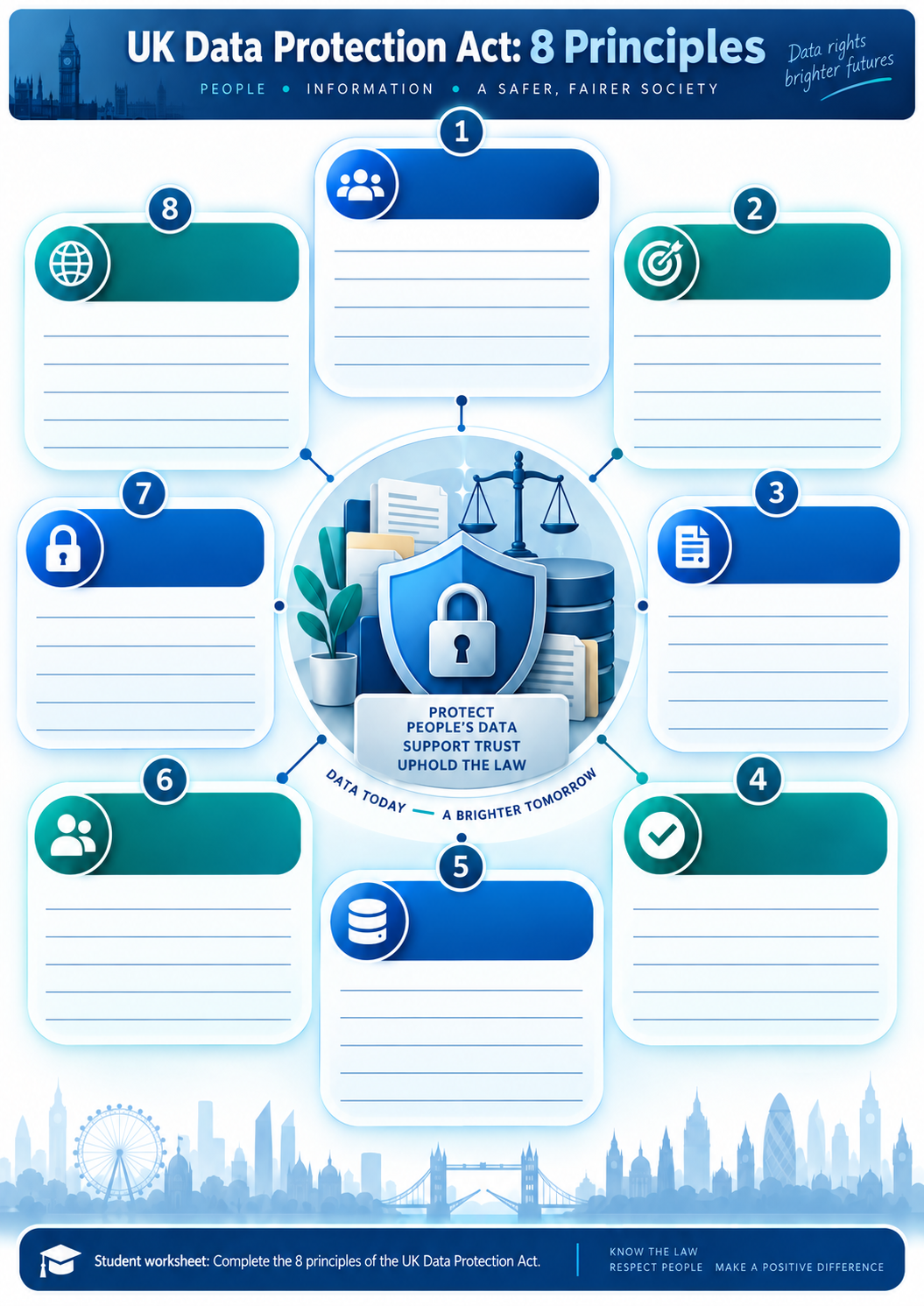
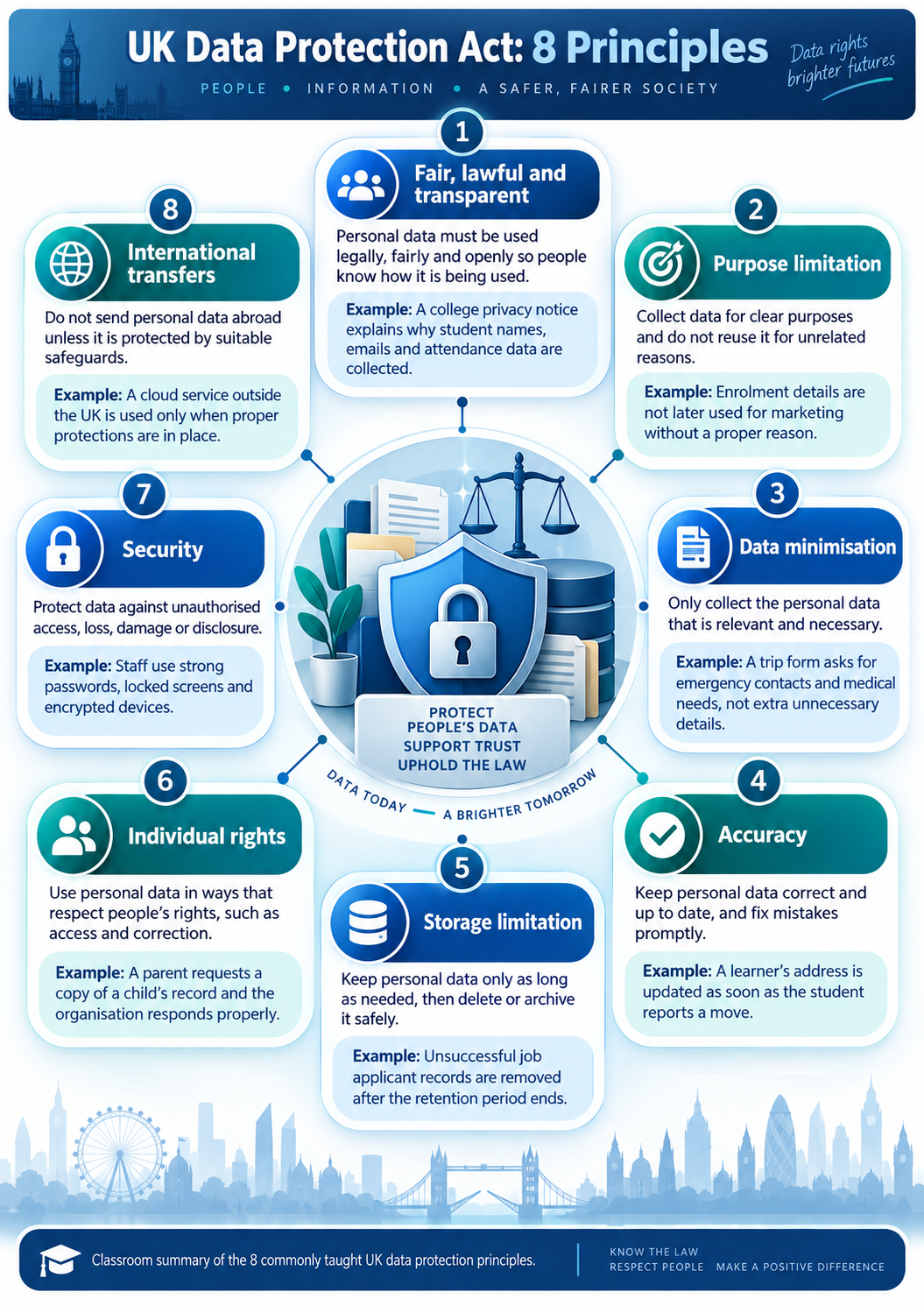
Eight principles.
1. Lawfulness, Fairness and Transparency
Personal data must be processed:
-
Lawfully – there must be a valid legal basis (e.g. consent, contract, legal obligation)
-
Fairly – data must not be used in ways that would surprise or disadvantage the individual
-
Transparently – individuals must be informed about how their data is used (usually via a privacy notice)
Example (Digital Support):
A college must clearly explain to students why it collects attendance data and how long it will be kept.
2. Purpose Limitation
Personal data must be:
-
Collected for specific, explicit, and legitimate purposes
-
Not reused for unrelated purposes without further consent or legal justification
Example:
Customer contact details collected for IT support tickets must not later be used for marketing unless permission is given.
3. Data Minimisation
Only data that is:
-
Adequate
-
Relevant
-
Limited to what is necessary
should be collected.
Example:
A helpdesk form should not ask for a user’s home address if email support is sufficient.
4. Accuracy
Personal data must be:
-
Accurate
-
Kept up to date
-
Corrected or deleted promptly if incorrect
Example:
An asset register must be updated when devices are reassigned to different users.
5. Storage Limitation
Data must:
-
Not be kept longer than necessary
-
Have defined retention periods
Example:
Old support tickets containing personal data should be securely deleted after the organisation’s retention period expires.
6. Integrity and Confidentiality (Security)
Personal data must be processed securely, protecting it from:
-
Unauthorised access
-
Accidental loss
-
Destruction or damage
This includes technical and organisational security measures.
Examples:
-
Strong passwords and multi-factor authentication
-
Encryption of laptops and backups
-
Role-based access control (RBAC)
7. Accountability
Organisations must:
-
Take responsibility for complying with the principles
-
Demonstrate compliance through documentation and policies
Examples:
-
Staff training records
-
Data protection policies
-
Incident response procedures
8. Rights of the Data Subject
Individuals have rights over their personal data, including:
-
Right to access
-
Right to rectification
-
Right to erasure (“right to be forgotten”)
-
Right to restrict processing
-
Right to data portability
-
Right to object
Example:
A user can request a copy of all personal data held about them by an IT service provider.
4.1.4 Understand Computer Misuse legislation:
The computer Misuse act was introduced in 1990, however it was partially introduced in 1988 in response to a legal case titled "R v Gold & Schifreen (1988) where a journalist hacker broke into the then Duke of Edinburgh’s (Prince Phillip) email account. Once the general public were aware of the situation there was outcry that uncovered the fact that no law existed against computer hacking. As a result of this the legislation was created partially and released in 1988 followed 2 years later with the full release.
How easy is it to get caught out?
Refelect on your own use of digital devices, have you experienced this?
|
Section |
Description | Maximum Prison Term | Maximum Fine |
Example |
Hyperlink to Section |
|---|---|---|---|---|---|
|
1 |
Unauthorized access to computer material |
Up to 2 years | Unlimited fine | Hacking into someone’s email account | |
|
2 |
Unauthorized access with intent to commit or facilitate commission of further offenses |
Up to 10 Years | Unlimited fine, |
Breaking into a computer system to steal data, |
|
|
3 |
Unauthorized acts with intent to impair the operation of a computer |
Up to 14 Years |
Unlimited fine, |
Launching a cyberattack to disrupt a network |
The principles of the Computer Misuse Act (CMA) 1990
Key aspects of the feature governing unauthorized access include:
Prohibition of Unauthorised Access: The Act clearly defines unauthorised access as accessing computer systems, programs, or data without proper authorisation. This includes bypassing security measures or accessing areas of a computer system beyond one's authorised privileges.
Protection of Data: The legislation aims to protect the confidentiality, integrity, and availability of data by preventing unauthorised access. This helps safeguard sensitive information from being accessed, modified, or deleted without proper authorisation.Scope: The legislation applies to unauthorised access to any computer system, whether it's owned by individuals, businesses, or the government. It covers a wide range of devices and networks, including computers, servers, and online platforms.
• consequences for company and employee
Penalties: The Act establishes penalties for unauthorized access, including fines and imprisonment, depending on the severity of the offense. For example, accessing a computer system without authorisation with the intent to commit further offenses carries a maximum penalty of up to 2 years in prison and/or a fine.
• employee awareness
• types of crimes covered by legislation.
Secure Your Digital Vault
Objective: Understand the importance of authorization and security in compliance with the Computer Misuse Act 1990.
Materials Needed: Personal computer or laptop Internet connection Basic understanding of computer operations
Steps:
1 - Introduction to the Act: Explain what the Computer Misuse Act 1990 is and why it's important for protecting digital information.
2 - Create a Digital Vault: Create a digital vault on a computer using encryption software. This could be a folder where you store sensitive files such as passwords, personal documents, or financial records.
3 - Set Authorization Levels: Set up authorisation levels for accessing the digital vault. This could involve creating a strong password or using biometric authentication if available.
4 - Test Authorisation: Demonstrate the importance of proper authorisation by attempting to access the digital vault without permission. Discuss why this would be illegal under the Computer Misuse Act 1990.
5 - Implement Security Measures: Implement additional security measures such as firewall protection, antivirus software, and regular software updates to further protect the digital vault from unauthorised access.
6 - Discuss Legal Implications: Discuss the potential legal implications of unauthorised access under the Computer Misuse Act 1990. Emphasize the importance of staying within the bounds of the law and respecting others' digital privacy.
7 - Reflection: Reflect on what has be learnt. Think about how you can apply these principles to safeguard your digital information and promote ethical behavior in your IT practices.
This activity provides a practical and hands-on approach for the you to understand the concept of unauthorised access and the importance of authorisation and security measures in compliance with the Computer Misuse Act 1990. It also encourages you to have critical thinking about digital ethics and responsible behavior in handling sensitive information.
Last Updated
2026-09-18 12:34:16
English and Maths
English
Maths
Stretch and Challenge
Stretch and Challenge
Homework
Homework
Equality and Diversity Calendar
How to's
How to's Coverage
Links to Learning Outcomes |
Links to Assessment Criteria |
|
|---|---|---|
Files that support this week
→
Next