Top
Week 3
Learning Aims and Objectives:
Aim:
In this week's page, students will learn how organisations use a range of technical, physical and procedural security controls to reduce cyber threats, protect systems and data, and maintain secure network environments.
Objectives:
1. By the end of this week's page students will be able to explain the purpose, processes, benefits and drawbacks of common threat mitigation techniques used to protect systems, networks and data.
2. By the end of the week's page students will be able to describe how security controls such as anti-malware, encryption, hashing, permissions, access policies, MFA and password managers help prevent unauthorised access and data compromise.
3. By the end of the week's page students will be able to explain how device hardening, backups, software and firmware updates, air gaps and secure API practices reduce vulnerabilities and improve organisational security.
4. By the end of the week's page students will be able to describe how port scanning, penetration testing and ethical hacking are used to identify security weaknesses and recommend appropriate improvements.
5. By the end of the week's page students will be able to explain how firewall configuration, network segregation and network monitoring are used to assure internet security and detect or prevent suspicious network activity.
8.3 Threat Mitigation
8.3.1 Understand the purposes, processes, benefits and drawbacks of common threat mitigation techniques:
Threat mitigation techniques are used to reduce the likelihood, impact, or success of cyber security threats within an organisation. Their purpose is to protect systems, data, and users from attacks such as malware infections, unauthorised access, data breaches, and denial-of-service attacks. The process generally involves identifying potential risks through risk assessments, implementing preventative controls, monitoring systems for suspicious activity, and responding to incidents when they occur. Common mitigation techniques include firewalls that filter incoming and outgoing network traffic, antivirus software that detects and removes malicious files, encryption that protects sensitive data during storage and transmission, and multi-factor authentication (MFA) which requires additional verification before access is granted. The benefits of these techniques include improved protection of data, reduced risk of financial loss or reputational damage, and increased trust from users and customers. However, there are also drawbacks; mitigation techniques can increase system complexity, require regular updates and maintenance, and sometimes impact system performance or usability. For example, strict firewall rules may block legitimate services, while strong authentication processes may slow down user access to systems.
Security settings
Security settings form a key part of threat mitigation by controlling how devices, networks, and applications behave in order to reduce vulnerabilities. These settings can be applied at both hardware and software levels.
Hardware
Hardware security measures include router and firewall configurations, BIOS/UEFI password protection, Trusted Platform Module (TPM) chips for secure encryption key storage, and physical security controls such as smart card readers or biometric scanners. These measures help protect the underlying infrastructure and prevent unauthorised physical or network access. Software-based security settings operate within operating systems and applications, including user account permissions, password policies, automatic update settings, disk encryption, and application sandboxing.
Software
Software tools such as endpoint protection platforms, vulnerability scanners, and intrusion detection systems further strengthen these protections by monitoring and analysing system activity. Together, hardware and software security settings create layered protection (often referred to as “defence in depth”), where multiple controls work together to detect, prevent, and respond to cyber threats.
Benefits of Threat Mitigation Techniques in Hardware and Software
Threat mitigation techniques implemented through both hardware and software provide several important security benefits. Hardware-based protections such as network firewalls, secure routers, hardware security modules (HSMs), and Trusted Platform Module (TPM) chips provide strong protection at the physical or infrastructure level. These devices can process security tasks independently from the main system, which can improve performance and make them more difficult for attackers to bypass. For example, a dedicated hardware firewall can filter network traffic before it even reaches internal systems, reducing exposure to threats. Software-based mitigation techniques, such as antivirus software, endpoint protection platforms, operating system security settings, vulnerability scanners, and intrusion detection systems, provide flexible and easily updateable protection. Software solutions can quickly adapt to new threats through updates and patches and allow administrators to configure user permissions, enforce password policies, and monitor system activity. When used together, hardware and software mitigation techniques create a layered security model known as defence in depth, where different security controls protect multiple parts of the system.
Drawbacks of Threat Mitigation Techniques in Hardware and Software
However, there are also drawbacks when implementing mitigation techniques in both hardware and software. Hardware security solutions can be expensive to purchase, install, and maintain, particularly for organisations that require enterprise-grade equipment such as advanced firewalls or specialised encryption hardware. Hardware upgrades may also be required as threats evolve, which adds additional cost and infrastructure changes. In contrast, software-based mitigation techniques often require frequent updates, patches, and active management to remain effective. If software security tools are not kept up to date, they may fail to detect newer threats. Software solutions can also impact system performance because processes such as real-time scanning, encryption, and monitoring use system resources. In addition, complex configurations across multiple software security tools can increase the risk of misconfiguration, potentially creating vulnerabilities rather than preventing them. As a result, organisations must carefully balance hardware and software mitigation strategies to maintain both strong security and efficient system performance.
Anti-malware software
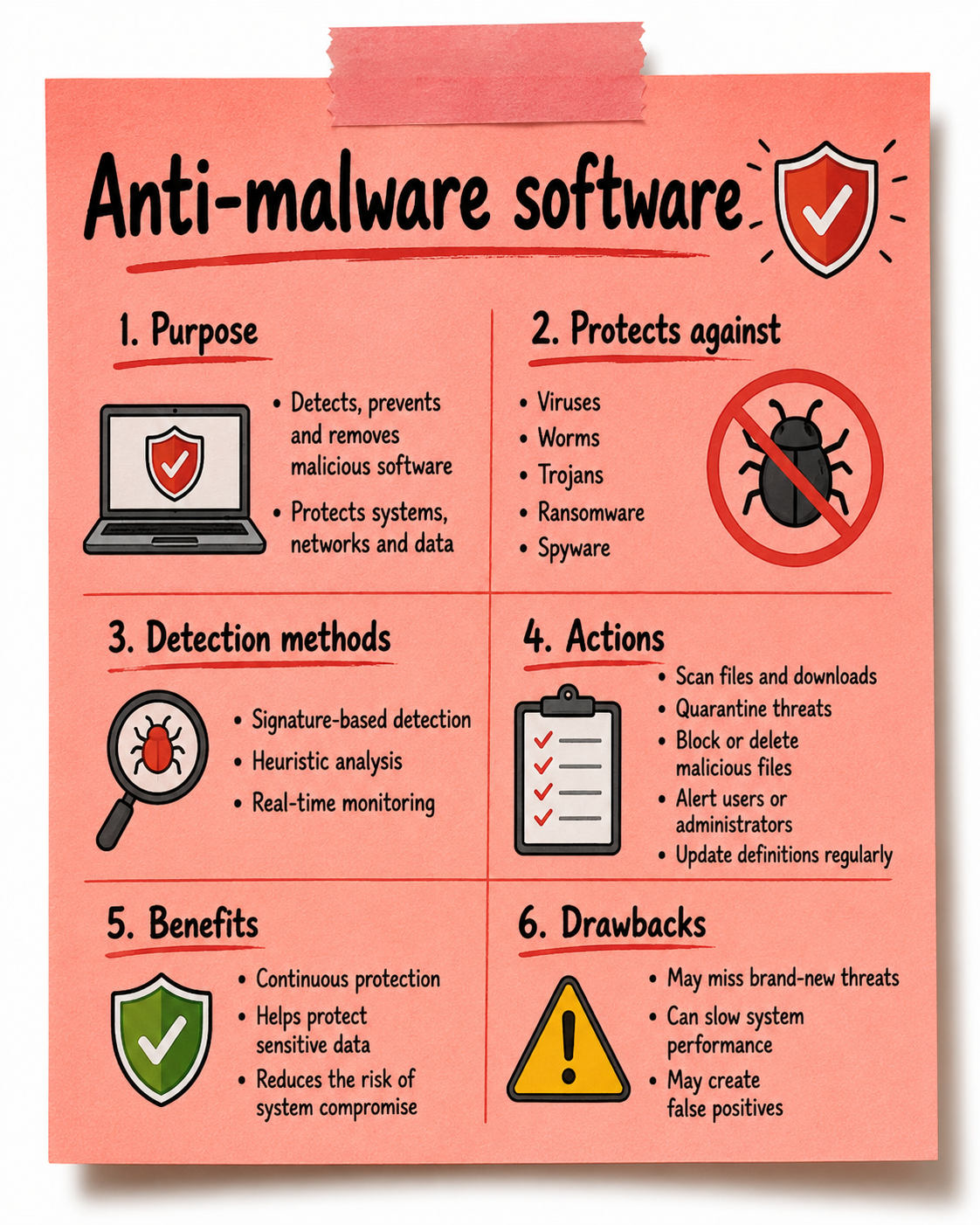
Anti-malware software is designed to detect, prevent, and remove malicious software such as viruses, worms, ransomware, spyware, and trojans. Its main purpose is to protect computer systems, networks, and data from unauthorised access, damage, or theft caused by malicious programs. The process used by anti-malware software typically involves several layers of detection. These include signature-based detection, where the software scans files and compares them to a database of known malware signatures; heuristic analysis, which looks for suspicious behaviour or patterns that resemble malware; and real-time monitoring, which continuously checks files, downloads, and system activity for threats. When a threat is identified, the software may quarantine, block, or remove the malicious file to prevent it from spreading or causing harm. Many anti-malware tools also include automatic updates to ensure they can recognise newly discovered threats.
There are several benefits to using anti-malware software. It provides continuous protection against a wide range of threats and can detect malware before it damages the system. It also helps protect sensitive data, reduce the likelihood of system compromise, and improve overall system reliability. Anti-malware tools are commonly used on both personal devices and organisational networks, making them a key part of many cyber security strategies.
However, anti-malware software also has some drawbacks. One limitation is that signature-based detection relies on known threats, meaning newly created or highly sophisticated malware may bypass detection until updates are released. The software can also impact system performance, particularly during full system scans or when real-time monitoring is active. In some cases, anti-malware programs may generate false positives, where legitimate files or applications are incorrectly identified as malicious and blocked.
Function
The function of anti-malware software is to protect computer systems, networks, and digital data from malicious software such as viruses, worms, trojans, ransomware, spyware, and other forms of malware. Its primary purpose is to detect potential threats, prevent them from executing, and remove them if they are found on a system. Anti-malware software works by analysing files, programs, and system processes to identify behaviour or patterns that may indicate malicious activity. It plays a critical role in maintaining the security and integrity of devices by reducing the risk of unauthorised access, system damage, or data theft. For example, when a user downloads a file from the internet or inserts a USB device, anti-malware software can automatically scan the file before it is opened to ensure it does not contain malicious code. In organisations, anti-malware solutions are often deployed across multiple endpoints, allowing administrators to centrally manage security policies and monitor threats across the network.
Actions
The actions performed by anti-malware software involve several processes designed to detect, respond to, and prevent malware infections. One key action is scanning, where the software checks files, applications, memory, and storage devices for known malware signatures. Many anti-malware tools also carry out real-time monitoring, continuously observing system activity, downloads, and running processes to identify suspicious behaviour before damage occurs. If a potential threat is detected, the software can take actions such as quarantining the file, which isolates it from the rest of the system so it cannot spread, or deleting the malicious program entirely. Some anti-malware systems also block harmful websites, prevent malicious email attachments from opening, and alert users or administrators when suspicious activity is detected. Regular definition updates are another important action, allowing the software to recognise newly discovered malware threats. Through these actions, anti-malware software helps to reduce the likelihood of successful cyber attacks and ensures that infected systems can be quickly cleaned and restored.
Intrusion detection
Encryption
Encryption is the process of converting readable data (plaintext) into an unreadable format (ciphertext) using a mathematical algorithm and a key. Its primary purpose is to protect the confidentiality and integrity of data, ensuring that only authorised users can access it.
In computing and IT, encryption is used in many areas, including:
-
Secure websites (HTTPS)
-
Password storage systems
-
Data transmission (e.g. emails, messaging apps)
-
File and disk protection (e.g. BitLocker, full disk encryption)
Hashing
Hashing is a process that converts data into a fixed-length string (hash value) using a mathematical function. Unlike encryption, hashing is one-way, meaning it cannot be reversed to obtain the original data.
How it Works
-
Input data (e.g. a password) is passed through a hash function
-
A unique hash is generated (e.g. using SHA-256)
-
Even a small change in input produces a completely different hash
Purpose
-
Password storage (systems store hashes, not actual passwords)
-
Data integrity checks (ensuring data hasn’t been altered)
Key Points
-
Not designed for decryption
-
Often combined with salting (adding random data) to improve security
Symmetric Encryption
Symmetric encryption uses a single shared key for both encryption and decryption.
How it Works
-
Sender encrypts data using a secret key
-
Receiver uses the same key to decrypt the data
Examples
-
AES (Advanced Encryption Standard)
-
DES (older, less secure)
Advantages
-
Very fast and efficient
-
Suitable for encrypting large amounts of data
Drawbacks
-
Key must be securely shared between parties
-
If the key is intercepted, the data can be compromised
Asymmetric Encryption
Asymmetric encryption uses two different keys:
-
A public key (shared openly)
-
A private key (kept secret)
How it Works
-
Data encrypted with the public key
-
Only decrypted with the matching private key
Examples
-
RSA
-
ECC (Elliptic Curve Cryptography)
Advantages
-
No need to share private keys
-
More secure for communication over networks
Drawbacks
-
Slower than symmetric encryption
-
More computationally intensive
User access policies
Digital systems like school networks, business IT systems or online platforms are always at risk from threats like hacking, viruses, or people accessing things they shouldn’t. To help stop these threats, organisations use user access controls, policies, and procedures. Let’s break this down into two key areas:
Permissions
What are permissions?
Permissions are rules that decide what each user is allowed (or not allowed) to do on a system. Think of it like having different keys to open different doors. Not everyone should be able to unlock every door!
Why are permissions important?
They help stop unauthorised users from accessing private or sensitive information. If someone only needs to write emails and use Word, there’s no reason they should be able to access finance files or system settings.
Examples of permissions:
-
A student can log in and use Word and PowerPoint but can’t install new software.
-
A teacher might be able to access class folders and mark books, but not see payroll data.
-
An IT technician might have full admin access because they need to maintain the system.
How this helps prevent threats:
-
Stops users from making harmful changes by accident.
-
Blocks hackers from easily moving around the system if they do get in.
-
Reduces the damage if someone’s login details are stolen.
IT User Policies
What is an IT user policy?
It’s a set of rules that explains how users should use the organisation's IT systems. Everyone who uses the system must agree to follow these rules.
What do these policies usually include?
-
Acceptable Use Policy (AUP): What you can and can’t do on the network. For example, not downloading dodgy software or visiting unsafe websites.
-
Password Policy: Rules for creating strong passwords, how often to change them, and not sharing them with others.
-
Data Protection Policy: How to handle private data safely, like student records or customer information.
-
Email and Internet Use: Guidelines to avoid spam, scams, and wasting time online.
How this helps prevent threats:
-
Educates users on safe behaviour.
-
Reduces the chance of someone accidentally causing a security problem.
-
Makes it easier to identify and deal with rule-breakers.
Example situation:
If a student downloads a game full of malware onto a school computer, they’ve broken the AUP. Because they agreed to the rules, the school can take action and also knows where to look to fix the problem.
Staff vetting
Staff vetting is important accross many areas of employment, the video below shows the process within the public sector. This video discusses the many points and areas that are looked at, and the potential need to ask others that you have worked with about you and in some situations about your close family members.
Staff training
The process of staff training as a threat mitigation technique involves educating employees about cyber security risks and how to safely use organisational systems. This usually begins with identifying the types of threats staff are most likely to encounter, such as phishing emails, social engineering, weak passwords, or unsafe use of devices. Organisations then deliver training through methods such as workshops, online learning modules, policy briefings, and simulated phishing exercises. Staff are also provided with guidance on reporting suspicious activity and following security procedures when handling sensitive data. Training is typically repeated regularly to ensure employees remain aware of new and evolving threats.
Benefits and Drawbacks
One of the main benefits of staff training is that it helps reduce human error, which is one of the most common causes of security breaches. Educated employees are more likely to recognise phishing attempts, follow security policies, and report suspicious activity early. Training is also relatively cost-effective compared to technical security solutions and helps create a stronger security culture within an organisation. However, there are also drawbacks. Staff training requires time and resources, and employees may forget information if training is not repeated regularly. In addition, not all staff will apply the guidance consistently, meaning human mistakes can still occur despite training.
Software-based access control
Device hardening
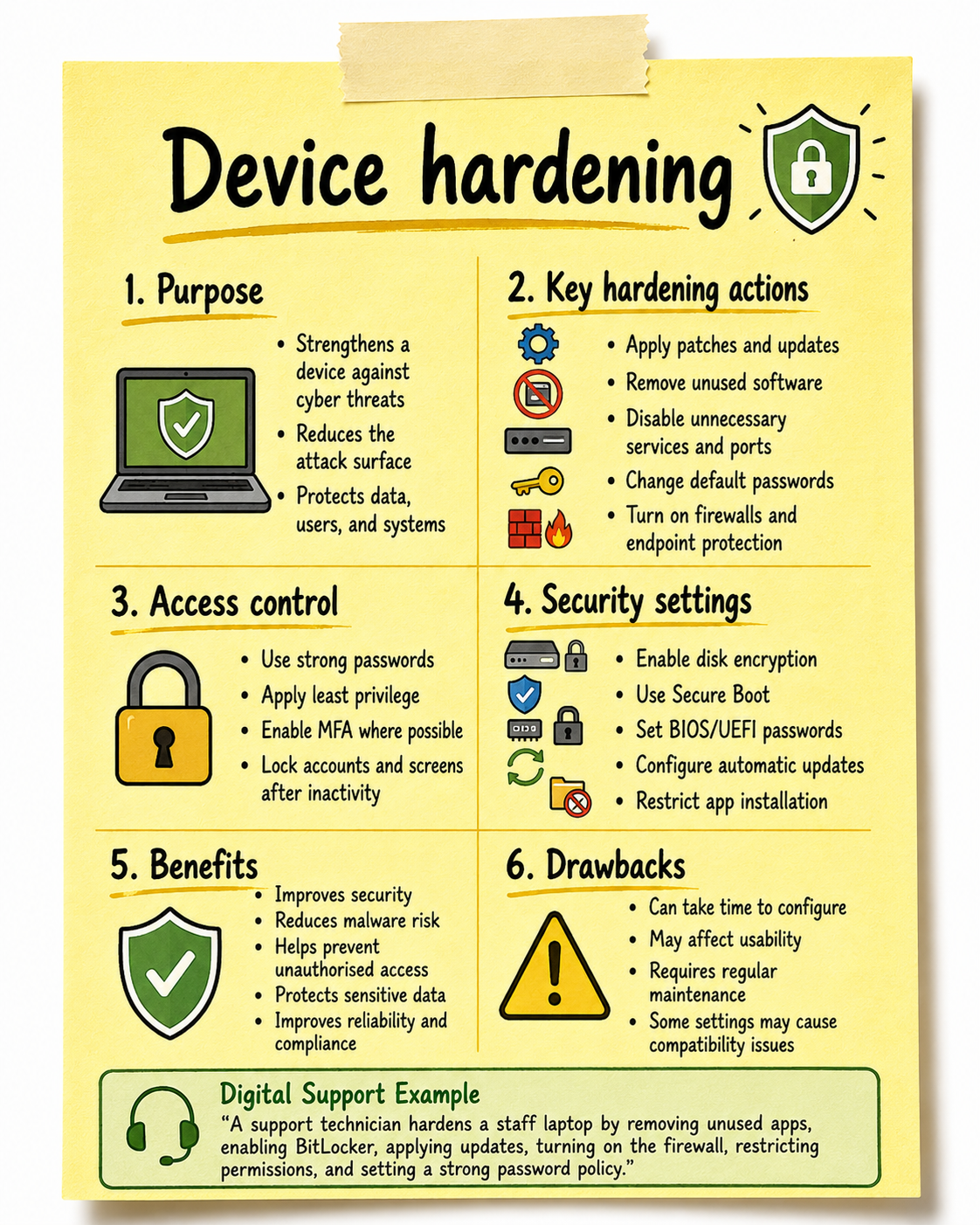
Device hardening means deliberately configuring a computer, server, phone or other endpoint so that there are fewer opportunities for an attacker to compromise it.
A useful way of thinking about it is:
Normal device - remove unnecessary features - secure what remains - keep it updated - restrict access - monitor it
The overall aim is to reduce the device's attack surface. Microsoft describes attack-surface reduction as removing risky or unnecessary behaviours from devices so attackers have fewer opportunities to gain a foothold.
These principles closely match the UK's Cyber Essentials controls: firewalls, secure configuration, security-update management, user-access control and malware protection. The NCSC specifically describes secure configuration as setting computers up securely to minimise the ways a cybercriminal can get in.
Example 1 - Hardening a staff laptop
Imagine a new Windows laptop is being prepared for a member of staff.
Without hardening, the user might have administrator rights, unnecessary applications could be installed, Windows may not be fully patched, the firewall might be poorly configured and the drive might not be encrypted.
A digital support technician could instead configure the laptop with BitLocker, automatic security updates, Microsoft Defender, firewall protection, Secure Boot, MFA and a standard user account. Unnecessary applications are removed and the screen automatically locks after inactivity.
The laptop can still perform its normal job, but an attacker now has considerably fewer ways to compromise it.
Example 2 - Preventing ransomware
An organisation could harden its PCs by enabling endpoint protection, limiting administrator privileges, keeping Windows patched and restricting which programs can execute.
This becomes particularly important with ransomware. Microsoft recommends measures such as cloud protection, tamper protection, attack-surface-reduction rules and network protection to strengthen devices against ransomware attacks.
If a malicious attachment attempts to execute a program, the endpoint security may block it. If it does execute under a standard user account, its ability to make system-wide changes may also be restricted.
That demonstrates defence in depth: the attacker has to overcome several controls rather than just one.
Recent real-world case study: St James's Place
A useful recent UK example comes from the National Cyber Security Centre's Cyber Essentials Supply Chain Playbook, published in December 2025.
St James's Place, one of the UK's largest wealth-management/pensions and life organisations, has a very large partnership network involving more than 2,800 independent businesses.
The organisation required businesses in its partnership network to achieve Cyber Essentials Plus.
This is highly relevant to device hardening because Cyber Essentials requires organisations to implement technical controls including secure configuration, firewalls, security updates, access controls and malware protection.
What changed?
The organisations had to adopt a much more consistent security baseline.
For example, devices and systems needed appropriate security configurations, unnecessary exposure needed to be reduced, software needed to be kept updated, access needed to be controlled and malware protection needed to be in place.
These are all fundamental elements of device and system hardening.
What was the result?
The NCSC case study reports a significant result. St James's Place's Divisional Director of Cyber Security reported that the organisation had seen around an 80% reduction in cyber-security incidents, which they associated with the controls and best practices introduced through Cyber Essentials.
That is a particularly useful example because the benefit was not necessarily that attacks disappeared.
Instead:
Attacks still happen - hardened systems give those attacks fewer opportunities to succeed.
This distinction is important for students. Cyber security controls generally cannot guarantee that an organisation will never be attacked. Their purpose is to reduce the likelihood that an attack succeeds and reduce the impact if one does.
The wider UK Government evaluation of Cyber Essentials supports this. It found that the scheme's technical controls are intended to mitigate common internet attacks, and 82% of surveyed Cyber Essentials users were confident that the controls protect against common cyber threats, while 80% believed they helped mitigate cyber-security risks within their organisation.
"How Hard can it be?"
Using a Windows Virtual Machine work through the below worksheet that explores the device hardening topic by exploring and configuing settings within the system.
Device Hardening Worksheet
Backups
o type (full, incremental, differential)
o safe storage
Software updates
What are software updates?
Software updates are new versions or improvements made to programs and systems you use - like Windows, antivirus software, web browsers, or apps.
Why are they important for security?
-
Fix security flaws: Hackers are always looking for weaknesses in software. Updates often fix these gaps before they can be used to attack the system.
-
Improve performance: Updates can also make software run better and smoother, which reduces system crashes that might be exploited by attackers.
-
New features or tools: Sometimes updates add tools that make it easier to manage security or improve user experience.
Example:
If a computer is using an old version of Windows that hasn’t been updated in months, it may be missing vital security fixes, making it an easy target for hackers or viruses.
Firmware/driver updates
Air gaps
Certification of APIs (application programme interface)
API certification is the process of testing, verifying, and formally approving an API to ensure it is secure, reliable, and compliant with industry standards before it is used in real-world systems.
What Does API Certification Involve?
1. Security Testing
-
Checks for vulnerabilities (e.g. injection attacks, broken authentication)
-
Ensures data is encrypted and protected
Example: Preventing hackers from accessing user accounts
Functional Testing
-
Ensures the API works as expected
-
Validates correct inputs and outputs
Example: A payment API correctly processes transactions
2. Compliance Checks
-
Ensures the API meets standards such as:
-
Open Web Application Security Project (OWASP API Security Top 10)
-
GDPR (for handling personal data in the UK/EU)
-
Example: Making sure personal data is handled legally
3. Performance & Reliability Testing
-
Tests how the API performs under heavy use
-
Ensures uptime and stability
Example: Can the API handle 10,000 users at once?
4, Authentication & Access Control Validation
-
Checks that only authorised users can access the API
-
Tests token systems (e.g. API keys, OAuth)
Example: Preventing unauthorised access to sensitive data
Who Certifies APIs?
API certification can be carried out by:
-
Internal security teams
-
Third-party security companies
-
Industry certification bodies
Some organisations follow frameworks such as:
-
ISO/IEC 27001
-
National Cyber Security Centre guidance
VPNs (Virtual private networks)
What is a VPN, and how does it work?
Multi-factor authentication (MFA)
"But is it really you?"
MFA Interactive Demo
Password managers
Just how secure
"Master Key"
Using the PC Mag website article that reviews and reflects on the top password managers in 2026 complete the worksheet using the link below.
Password Managers Worksheet
Now Check your answers using the following completed version.Password Managers Worksheet
Port Scanning
Port scanning is a threat mitigation technique used to identify open, closed, or filtered network ports on computers, servers, and network devices. Its main purpose is to identify exposed services that could potentially be exploited by attackers. During the process, tools such as Nmap scan a system's ports and report which services are accessible, allowing cybersecurity professionals to assess and secure unnecessary or vulnerable ports. The benefits of port scanning include improving network security, reducing the attack surface, and helping organisations identify potential weaknesses before they are exploited. However, port scanning also has drawbacks, as it can produce false positives, require technical knowledge to interpret the results, and may cause disruption if carried out too aggressively. It should therefore only be performed on systems where proper authorisation has been given.
"Ew Test Me"
Using the online port scanner provided by Pentest-Tools test on MyStudentSite to see what ports that might be open. Remember this is not advisable to do on sites that you do not have permission from, as this would be a breach of the Computer Misuse Act.
Port Scanner with Nmap scan for open TCP and UDP ports
Penetration Testing
Penetration testing (often called pen testing) is a simulated cyberattack performed on a computer system, network, web application, or organization to identify security vulnerabilities before malicious attackers can exploit them.
How penetration testing works
A typical penetration test involves these steps:
Planning and Reconnaissance
Define the scope and opjectives
Gather information about the task such as domains, IP addresses and technologies.
Scanning
Identify open ports, running services, operating systems, and potential vulnerabilities.
Exploitation
Attempt to exploit identified vulnerabilities to gain unauthorised access.
Examples include exploiting weak passwords, software flaws, or misconfigurations.
Post-exploitation
Determine what data or systems could be accessed.
Assess how far an attacker could move within the network.
Reporting
Document vulnerabilities, evidence of exploitation, risk ratings, and remediation recommendations.
However, penetration testing can be done in two ways that could have different results, legally, as a consequence if an organisation were to find possible breaches. The two areas that we will look are hear are, Ethical Hacking and Unethical Hacking.
Ethical Hacking

Ethical hacking is the practice of legally and intentionally trying to break into computer systems, networks, applications, or devices to find security weaknesses before criminals can exploit them.
An ethical hacker is also called a white-hat hacker.
The company gives an ethical hacker written permission to test it.
The ethical hacker might try to:
- Find vulnerable software or configuration
- Test whether passwords can be guessed
- Look for SQL injection or XSS vulnerabilities
- Test authentication and access controls
- See whether sensitive information can be accessed
- Determine how an attacker could potentially compromise the system
The hacker then reports the vulnerabilities to the company, along with recommendations for fixing them.
Unethical Hacking

Unethical hacking is when someone accesses, attacks, or interferes with a computer system, network, account, or data without permission, usually for harmful, illegal, or personal purposes.
It is often called malicious hacking or black-hat hacking.
An unethical hacker might:
- Steal someone's password or account
- Steal financial or personal information
- Install malware or ransomware
- Break into a company's computer network without authorization
- Use phishing to trick people into revealing credentials
- Delete, alter, or damage data
- Demand money after compromising a system
"What hat shall i wear"
What are the other types of coloured hats in hacking?
"Heads Up"
In groups of no more than 3 create a presentation on your allocated coloured hat. Your presentation should explain what the hat is, examples/situations where this has happened and the consiquences of this to the organisation its users, and those involved.
8.3.2 Understand the processes and procedures that assure internet security, and the reasons why they are used:
Firewall configuration
o rules for traffic (inbound and outbound)
o traffic type rules
o application rules
o IP address rules
"Up against the Wall"
Using the Packet tracer program apply firewall rules to block external users from accessing a corperate internal web server.
Using the following activity sheet as a guide impliment and test the creation and configuration of the system.
Firewall Packet Tracer Worksheet
Network Segregation
o virtual
o physical
o offline network
Network monitoring
Network monitoring is more than watching whether a network is online. From a security perspective, it is the continuous or periodic collection and analysis of information about network communications, devices and services so that abnormal behaviour can be identified and investigated. The NCSC describes logging as the foundation of security monitoring, with monitoring taking this further by actively analysing that information for signs of attacks or unusual behaviour.
| Process / procedure | What happens |
Why it is important |
|---|---|---|
|
Define monitoring objectives |
The organisation identifies important systems, likely threats and the information that needs to be monitored. |
Prevents unnecessary data collection and ensures monitoring is appropriate to the organisation's risks. |
|
Establish a baseline |
Normal bandwidth, connection numbers, destinations, services, operating times and device behaviour are recorded. |
Prevents unnecessary data collection and ensures monitoring is appropriate to the organisation's risks. |
|
Collect monitoring information |
Evidence can come from firewalls, routers, switches, DNS, proxies, network-flow systems, IDS, servers and network-management tools. |
Provides evidence of who or what communicated, where it communicated, when it occurred and how much data was transferred. |
|
Centralise logs |
Important records can be sent to a central logging or SIEM platform. |
Makes it easier to search across several systems and correlate events that might otherwise appear unrelated. |
|
Protect monitoring records |
Access is restricted, logs are protected against alteration and timestamps should be accurate and consistent. |
An attacker who can modify logs may be able to hide their activity. Reliable timestamps are also essential when reconstructing an incident. |
|
Analyse and correlate |
Rules, thresholds, signatures, baselines and behavioural analysis are applied to events. |
A single connection may be legitimate; a repeated or correlated pattern can indicate a much greater security concern. |
|
Generate alerts and triage them |
Suspicious events are prioritised by severity, confidence and potential impact. |
Allows analysts to focus on significant events rather than manually examining every network transaction. |
|
Investigate |
Analysts compare the alert with the baseline and examine related evidence from other monitoring systems. |
Helps distinguish a genuine incident from a false positive or legitimate unusual activity. |
|
Respond and escalate |
The authorised incident procedure is followed, evidence is preserved and the appropriate staff are informed. |
Reduces the impact of an incident while ensuring actions are controlled, recorded and accountable. |
|
Review and tune monitoring |
Following incidents, organisations review detection rules, thresholds and monitoring coverage. |
Improves future detection and reduces unnecessary alerts. |
The particularly important concept for students is baseline plus correlation. A sudden increase in bandwidth might be suspicious, but it could equally represent a legitimate software deployment. Network monitoring is therefore used for early detection, investigation, protection of availability, validation of security controls, forensic reconstruction and accountability. It also complements controls such as firewalls rather than replacing them. For example, a firewall may legitimately allow HTTPS on TCP 443, while monitoring subsequently identifies that a workstation is sending an abnormal quantity of data through that permitted connection.
"Eye'm Watching you"
Using the following Network Monitoring Tool review the simulations and complete the worksheet that is linked inside the simulation.
Network Monitoring Worksheet
Port scanning
A port scan is a reconnaissance technique used to identify open ports and potential vulnerabilities on a networked device or system. Cyber criminals often use port scanning to investigate which network services are active, which ports are accepting connections, and whether data is being transmitted through them. This process can also provide clues about the presence of protective measures, such as firewalls or intrusion detection systems, that an organisation has put in place.
When a hacker sends a request to a specific port, the type of response received can reveal important information. For instance, it may show whether the port is open, closed, or filtered. This helps an attacker build a picture of the target system and identify weaknesses that may be exploited in a later attack.
A hacker scans a company’s server and discovers that port 80 is open. This suggests that a web server is running. If that web server is outdated or poorly configured, the attacker may attempt to exploit it to gain unauthorised access or disrupt services.
Last Updated
2026-09-18 12:46:01
English and Maths
English
Maths
Stretch and Challenge
Stretch and Challenge
Homework
Homework
Equality and Diversity Calendar
How to's
How to's Coverage
Links to Learning Outcomes |
Links to Assessment Criteria |
|
|---|---|---|
Files that support this week
→
Next ←
Prev