Top
Week 1
1.1 Understand the types of preventative business control techniques and be able to apply and maintain them in protecting the digital security of an organisation
Preventative control techniques:
Physical:

– specialist locks (anti-picking)
– barriers (for example, fencing, bollards)
– gates
– cages
– flood defence systems
– temperature control (for example, air conditioning)
combined – managed access:
– card readers
– biometric
– video
– pin/passcodes
Administrative, policies and procedures:
– separation of duties and relevance of role-based access
Technical – domains and security policies:
– allowlist
– denylist
– access control lists
– sandboxing
– device hardening
– certificate authority.
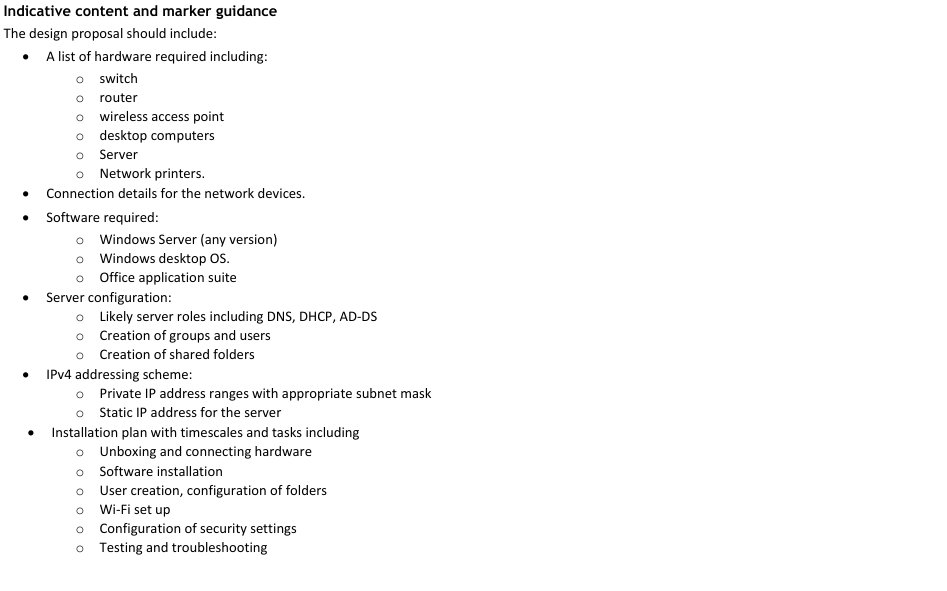
Set up a domain services environment with security controls (for example, group-based security and permissions, password complexity).
Set up and deploy a certificate authority (for example, directory certificate services – install onto PC).
Implement security controls in a business environment in line with NCSC cyber essentials:
Boundary firewalls
Secure configuration (for example, enabling multi-factor authentication (MFA))
Access control
Malware protection
Patch management
Configure and apply appropriate access control methods to end user devices (for example, authentication, MAC, DAC, ABAC, RBAC).
Manage documents and data accurately in accordance with data protection legislation.
(E5, D1, D5, D6)
1.2 Understand the types of detective business control techniques in protecting the digital security of an organisation
Detective control techniques:
Physical:
– closed-circuit television (CCTV)
– motion sensors
Administrative, policies and procedures:
– logs (for example, logs of temperature in server room, error logs)
– review/audit (for example, people entering and leaving the facilities).
1.3 Understand the types of corrective business control techniques in protecting the digital security of an organisation
Corrective control techniques:
Physical:
– fire suppression (for example, sprinklers, extinguishers)
– gas suppression (for example, inert and chemical gas systems)
Administrative, policies and procedures:
– standard operating procedure (for example, actions taken when a fire is identified).
1.4 Understand the types of deterrent business control techniques in protecting the digital security of an organisation
Deterrent control techniques:
Physical:
– security guards
– alarm systems
– visible surveillance systems
Administrative, policies and procedures:
– standard operating procedure (for example, setting alarm system, fire drill)
– employment contracts stipulating codes of conduct
– acceptable usage policies.
1.5 Understand the types of directive business control techniques in protecting the digital security of an organisation
Directive control techniques:
Physical:
– signage
– mandatory ID badge display (employees and visitors)
Administrative, policies and procedures:
– agreement types
– general security policies and procedures
– regular and compulsory staff training (for example, human firewall training).
1.6 Understand the types of compensating business control techniques in protecting the digital security of an organisation
Compensating control techniques:
Physical:
– temperature controls (for example, air conditioning)
Administrative, policies and procedures:
– role-based awareness training
– standard operating procedures (for example, environmental control monitoring).
1.7 Be able to apply and monitor appropriate business control techniques and policies and procedures to ensure personal, physical and environmental security
Review the identified risk:
Gather information from system and users.
Select, apply and monitor appropriate business control techniques:
Preventative
Detective
Corrective
Deterrent
Directive
Compensating
Recovery.
Comply with relevant regulatory and organisational policies and procedures.
(D3)
1.8 Understand components of a disaster recovery plan in protecting the digital security of an organisation
Disaster recovery plan (DRP) components:
Physical:
– back-ups
– off-site alternative storage of servers
Administrative, policies and procedures of a DRP supported by an organisational business continuity plan (BCP):
– ensuring all systems maintain functionality (for example, arranging hardware)
– ensuring users can access systems away from the main building site
– deploying back-ups to maintain data integrity
– ensuring digital changes continue to meet business needs
– managing assets across the network and logging changes (for example, tagging and logging laptops)
– reporting infrastructure changes to management.
1.9 Understand the types of impacts that can occur within an organisation as a result of threats and vulnerabilities
Danger to life – breaches in health and safety policies (for example, injury and death).
Privacy – breaches of data (for example, compromised confidential business data, identity theft).
Property and resources – damage to property and systems.
Economic – financial loss or impairment.
Reputation – damage to brand and business value.
Legal – fines, prosecution.
1.10 Understand the potential vulnerabilities in critical systems
Unauthorised physical access to network ports.
User account control.
Single point of failure.
Open port access:
Universal serial bus (USB)
Network ports.
• Wireless networks.
1.11 Understand the impact of measures and procedures that are put in place to mitigate threats and vulnerabilities
Measures:
Recovery time objective (RTO)
Recovery point objective (RPO)
Mean time between failure (MTBF)
Mean time to repair (MTTR).
Procedures:
Standard operating procedure (SOP):
– installation procedure
– back-up procedure
– set-up procedure.
Service level agreement (SLA):
– system availability and uptime
– response time and resolution timescales.
1.12 Understand the process of risk management
Process:
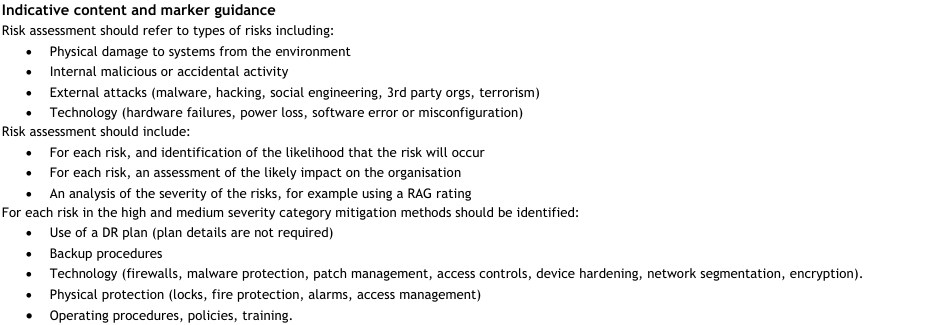
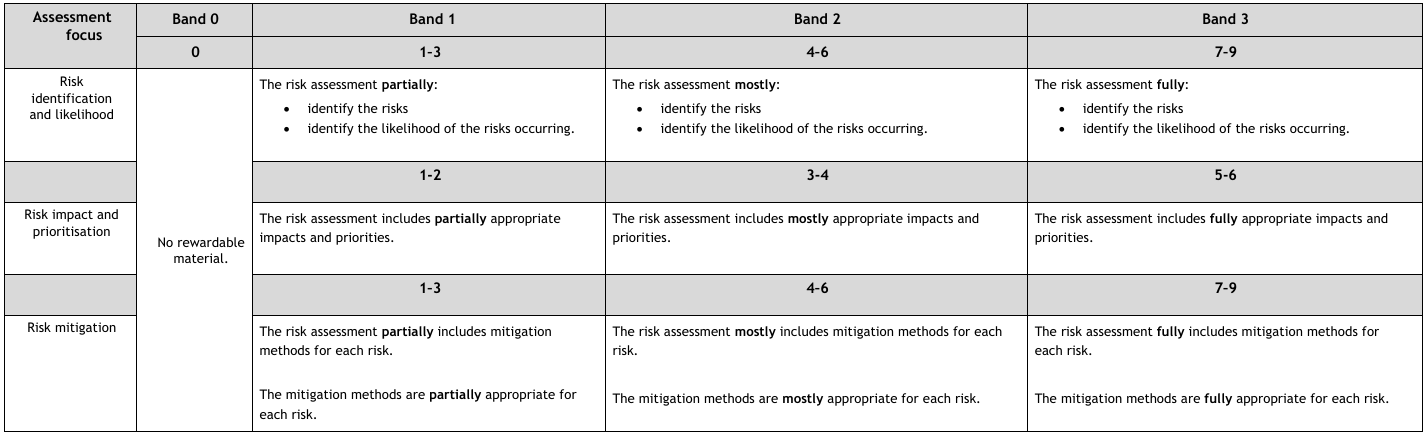
Identification – identifying potential risk or threats and vulnerabilities
Probability – likelihood of occurrence (for example, high, medium, low)
Impact – assess damage that can occur (for example, asset value)
Prioritisation – rank risks based on the analysis of probability and impact, ownership of risk
Mitigation – reducing probability or impact of risk.
1.13 Understand approaches and tools for the analysis of threats and vulnerabilities
Approaches:
Qualitative – non-numeric:
– determine severity using red, amber, green (RAG) rating:
-- red – high risk requiring immediate action
-- amber – moderate risk that needs to be observed closely
-- green – low risk with no immediate action required
Quantitative – numeric:
– analyse effects of risk (for example cost overrun,
resource consumption).
• Tools:
Fault tree analysis
Impact analysis
Failure mode effect critical analysis
Annualised loss expectancy (ALE)
Central Computer and Telecommunications Agency (CCTA)
Risk Analysis and Management Method (CRAMM)
Strength, weakness, opportunity, threat (SWOT) analysis
Risk register – risk is identified and recorded using a RAG rating.
1.14 Understand factors involved in threat assessment for the mitigation of threats and vulnerabilities
Environmental:
Extreme weather
Natural disaster
Animals (for example, rodent in server room)
Humidity
Air quality.
• Manmade:
Internal:
– malicious or inadvertent activity from employees and contractors
External:
– malware
– hacking
– social engineering
– third-party organisations
– terrorism.
Technological:
Technology failures and faults:
– misconfigured devices
– Wi-Fi dropouts
– inaccessible systems
– VPN not connecting
– expired passwords
Device failure and faults (for example, laptops,
tablets, telephones):
– hard disk failure
– RAM failure
– damaged peripherals
System failures and faults:
– software breakages/corruption
– inaccessible websites
Impact of technical change:
– potential downtime
– system/software upgrades
– misconfigured systems.
Political:
Changes/amendments in legislation.
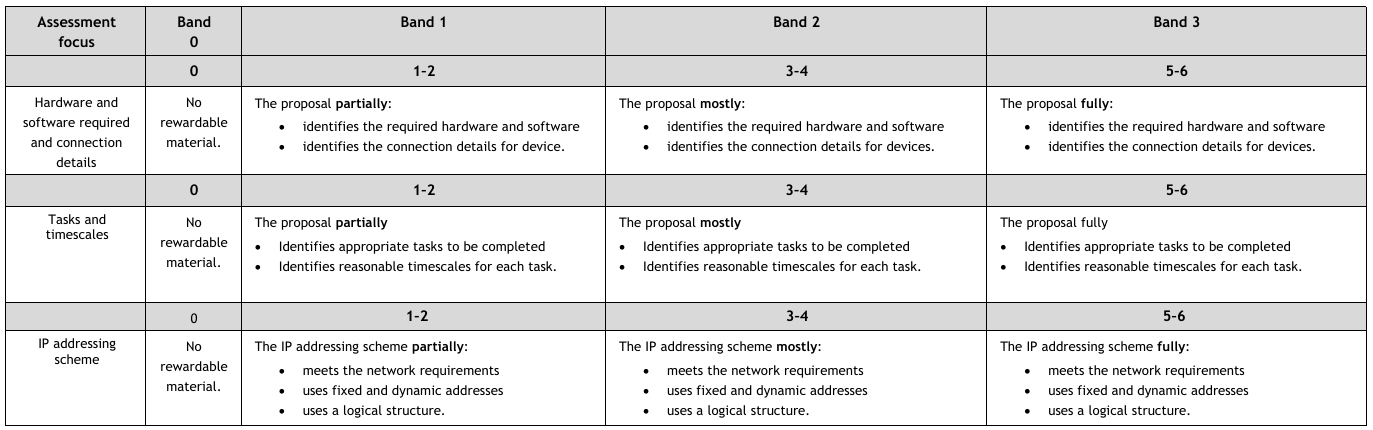
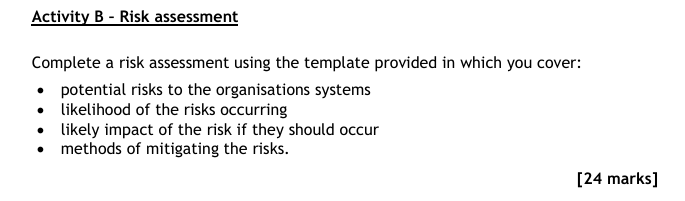
1.15 Understand the purpose of and be able to carry out risk assessment in a digital support context
Purpose:
To identify and reduce risk by:
– implementing Health and Safety Executive (HSE) guidelines to projects (for example, supporting users with safe ergonomic equipment usage and accessibility)
– investigating risks within the project environment (for example, undertaking a PESTLE analysis)
– internal and external risk identification (for example, system access for employees and contractors)
– quantification of impact on asset value (for example, financial loss as a result of downtime).
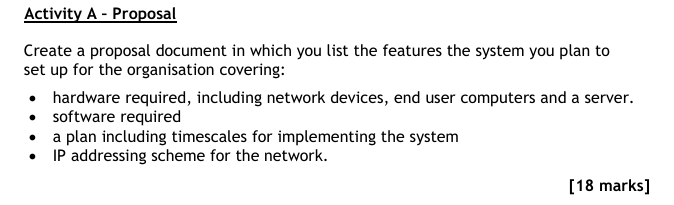
Conduct a security risk assessment in line with the risk management process for a system (for example, BYOD):
Assess the system and identify components.
Apply the risk management process:
Identify possible risks within the system
Calculate the probability and impact of the identified risk
Analyse and prioritise based on level of risk to system
Record all relevant findings and actions accurately and concisely using appropriate technical terms.
(E4, M6, D4)
1.16 Understand types of risk response within a digital support context
• Types of response:
o accept – the impact of the risk is deemed acceptable
o avoid – change scope to avoid identified risk
o mitigate – reduce the impact or probability of the identified risk
o transfer – contractually outsource the risk to another party.
1.17 Understand the process of penetration testing within digital support
• Penetration testing (for example wireless network tests):
o customer engagement
o information gathering
o discovery and scanning
o vulnerability testing
o exploitation
o final analysis and review
o utilise the test results.
1.18 Understand the considerations in the design of a risk mitigation strategy and be able to demonstrate continuous improvement through the application of risk mitigation in maintaining the digital security of an organisation and its data in a digital support context
• Risk response (for example, accept, avoid, mitigate or transfer the risk).
• User profile (for example, requirements, ability level).
• Cost and benefit.
• Escalation to appropriate authority within organisation.
• Identify, gather and systematically organise information on incidents in preparation for analysis.
• Process and analyse trends in incident data to identify underlying risks.
• Identify user profile (for example, requirements, ability level).
• Identify and apply risk mitigation techniques to the identified threats, vulnerabilities or incidents detected in end user devices (for example, installing RMM software, device hardening).
• Monitor and review as part of a continuous improvement process:
o assign an owner of the risk
o plan contingencies
o update devices with current security software
o interpret the outputs of penetration testing.
1.19 Understand the purpose of technical security controls as risk mitigation techniques and their applications to business risks within a digital support context
• Purpose – to improve network security for users and systems.
• Technical security controls and their applications:
o 5 cyber essentials controls:
– access control – restricting access to a minimum based on user attributes (for example, principle of least privilege, username and password management)
– patch management – maintaining system and software updates to current levels
– malware protection – maintaining up-to-date anti-malware/anti-virus software and regular scanning
– boundary firewalls and internet gateways – restricting the flow of traffic in systems
– secure configuration – ensuring user only has required functionality (for example, removing unnecessary software, configuration to limit web access)
o device hardening – removing unneeded programs, accounts functions, applications, ports, permissions and access
o remote monitoring and management (RMM) (for example, end user devices)
o vulnerability scanning (for example, port scanning, device scanning).
1.20 Be able to demonstrate continuous improvement through the application of risk mitigation in maintaining the digital security of an organisation and its data in a digital support context
• Identify, gather and systematically organise information on incidents in Preparation for analysis.
• Process and analyse trends in incident data to identify underlying risks.
• Identify user profile (for example, requirements, ability level).
• Identify and apply risk mitigation techniques to the identified threats, vulnerabilities or incidents detected in end user devices (for example, installing RMM software, device hardening).
• Monitor and review as part of a continuous improvement process:
o assign an owner of the risk
o plan contingencies
o update devices with current security software
o interpret the outputs of penetration testing
o record all relevant findings and actions accurately and conciselyusing appropriate technical terms.
(E4, M5, D4)
1.21 Understand the purpose and types of encryption as a risk mitigation technique and their applications
• Purpose – to store and transfer data securely using cryptography.
• Types of encryption and their applications:
o asymmetric encryption – applied to send private data from one user to another (for example, encrypted email systems)
o symmetric encryption – applied to encrypt and decrypt a message using the same key (for example, card payment systems).
• Data at rest encryption:
o full disk encryption – applied to encrypt the contents of an entire hard drive using industry standard tool (for example, Windows, macOS)
o HSM – safeguards digital keys to protect a device and its data from hacking
o TPM – applied to store encryption keys specific to the host device.
• Data in transit encryption:
o SSL – applied to create an encrypted link between a website and a browser using security keys for businesses to protect the data on their websites
o TLS – applied to encrypt end-to-end communication between networks (for example, in email, websites and instant messaging).
1.22 Understand the purpose, criteria and types of back-up involved in risk mitigation
• Purpose:
o maintaining an up-to-date copy of data to enable future recovery and restoration (for example, full disaster recovery or partial data loss).
• Back-up criteria:
o frequency (for example, periodic back-ups)
o source (for example, files or data)
o destination (for example, internal, external)
o storage (for example, linear tape open (LTO), cloud, disk).
• Types of back-up:
o full
o incremental
o differential
o mirror.
1.23 Understand the relationship between organisational policies and procedures and risk mitigation and be able to explain their importance in respect of adherence to security
• Organisational digital use policy:
o standard operating procedures for:
– network usage and control (for example, monitoring bandwidth, identifying bottlenecks)
– internet usage (for example, restricted access to sites, social media)
– bring your own device (BYOD)
– working from home (WFH) (for example, DSE assessment)
– periodic renewal of password
– software usage (for example, updating applications).
• Health and safety policy for:
o standard operating procedures:
– lone working
– manual handling/safe lifting (for example, moving hardware)
– working at height
– fire safety (for example, staff training)
– Reporting of Injuries, Diseases and Dangerous Occurrences Regulations (RIDDOR) 2013.
• Change procedure – approval and documentation of all changes:
o auditing of policies and standard operating procedures – ensuring all actions are routinely examined (for example, to ensure continued compliance).
• Explain the purpose and application of each policy and procedure, summarising key information and using appropriate technical terms:
o digital use policy
o health and safety policy.
• Explain the potential impact on security if policies and procedures are not adhered to (for example, danger to life, privacy).
(E5, D5)
1.24 Understand the purpose and application of legislation, industry standards and regulatory compliance, and industry best practice guidelines for the security of information systems in the context of digital support
• Legislation:
o EU General Data Protection Regulation (GDPR):
– purpose – standardises the way data is used, stored and transferred to protect privacy
– applications within digital support:
-- article 1 – subject matter and objectives
-- article 2 – material scope
-- article 3 – territorial scope
-- article 4 – definitions
-- article 5 – principles relating to processing of personal data
-- article 6 – lawfulness of processing
-- article 7 – conditions for consent.
o Data Protection Act (DPA) 2018:
– purpose – UK interpretation of GDPR to protect data and privacy
– applications within digital support:
-- used fairly, lawfully and transparently
-- used for specified, explicit purposes
-- used in a way that is adequate, relevant and limited to only what is necessary
-- accurate and, where necessary, kept up-to-date
-- kept for no longer than is necessary
-- handled in a way that ensures appropriate security, including protection against unlawful or unauthorised processing, access, loss, destruction or damage
o Computer Misuse Act 1990:
– purpose – protects an individual’s computer rights
– applications within digital support:
-- unauthorised access to computer materials (point 1 to 3)
-- unauthorised access with intent to commit or facilitate commission of further offences (point 1 to 5)
-- unauthorised acts with intent to impair, or with recklessness as to impairing, operation of computer (point 1 to 6).
• Industry standards and regulatory compliance:
o ISO 27001:2017:
– purpose – certifiable standard for information security management
– applications within digital support:
-- GDPR/DPA 2018
-- information security
-- information management
-- penetration testing
-- risk assessments.
o Payment Card Industry Data Security Standard (PCI DSS):
– purpose – worldwide standard for protecting business card payments to reduce fraud
– applications within digital support:
-- build and maintain a secure network
-- protect cardholder data
-- maintain a vulnerability management program
-- implement strong access control measures
-- regularly monitor and test networks
-- maintain an information security policy.
Industry best practice guidelines:
o National Cyber Security Centre (NCSC) ‘10 Steps to Cyber Security’:
– purpose – inform organisations about key areas of security focus
– applications within digital support:
-- user education and awareness
-- home and mobile working
-- secure configuration
-- removable media controls
-- managing user privileges
-- incident management
-- monitoring
-- malware protection
-- network security
-- risk management regime.
o Open Web Application Security Project (OWASP):
– purpose:
-- implements and reviews the usage of cyber security tools and resources
-- implements education and training for the general public and for industry experts
-- used as a networking platform.
– applications within digital support:
-- support users with online security
-- improve security of software solutions.
1.25 Understand the principles of network security and their application to prevent the unauthorised access, misuse, modification or denial of a computer, information system or data
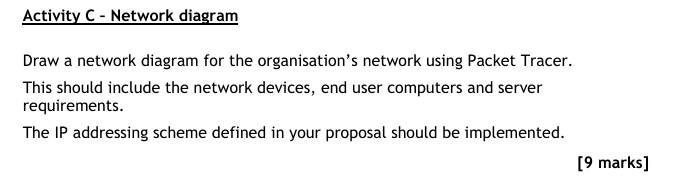
• The CIA triad – confidentiality, integrity and availability applied to the development of security policies.
• IAAA (identification, authentication, authorisation and accountability)
– applied to prevent unauthorised access by implementing security policies to secure a network further:
o applying directory services
o security authentication process
o using passwords and security implications
o identification and protection of data
o maintaining an up-to-date information asset register.
1.26 Understand methods of managing and controlling access to digital systems and their application within the design of network security architecture
• Authentication – restricts or allows access based on system verification of user.
• Firewalls – restricts or allows access to a defined set of services.
Apply and monitor appropriate access control methods to support physical and virtual infrastructure as required:
o intrusion detection system (IDS) – analyses and monitors network traffic for potential threats
o intrusion prevention system (IPS) – prevents access based on identified potential threats
o network access control (NAC) – restricts or allows access based on organisational policy enforcement on devices and users of network
o mandatory access control (MAC) – restricts or allows access based on a hierarchy of security levels
o discretionary access control (DAC) – restricts or allows access based on resource owner preference
o attribute-based access control (ABAC) – restricts or allows access based on attributes or characteristics
o role-based access control (RBAC) – restricts or allows access to resources based on the role of a user
o rule-based access control (RuBAC) – use a rule list to define access parameters.
1.27 Understand physical and virtual methods of managing and securing network traffic and their application within the design of network security architecture
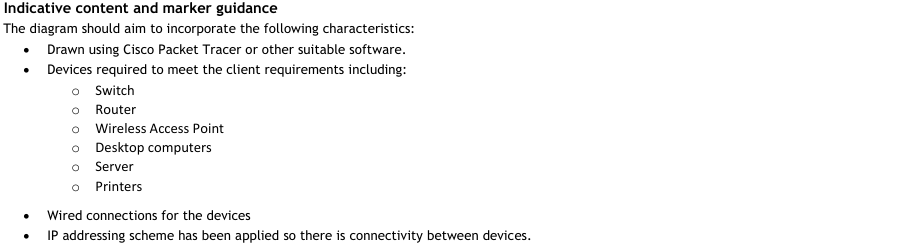
• Physical (for example businesses utilising servers, firewalls and cabling):
o software defined networking (SDN):
– transport layer security (TLS) (for example, used for banking websites)
o demilitarised zone (DMZ)
o air gapping.
• Virtual:
o virtual LAN (VLAN):
– virtual private network (VPN) (for example, intranet, file systems, local network systems)
o virtual routing and forwarding (VRF)
o subnets
o IP security (IPSec)
o air gapping.
1.28 Understand techniques applied and be able to install and configure software to ensure cyber security for internet connected devices, systems and networks
• Wireless security – WPA2 and WPA3 and use of end-to-end security implemented to monitor access to Wi-Fi systems.
• Device security – password/authentication implemented to improve device security.
• Encryption.
• Virtualisation
• Penetration testing.
• Malware protection.
• Anti-virus protection.
• Software updates and patches.
• Multi-factor authentication.
• Single logout (SLO).
• Install and configure software on end user devices:
o vulnerability scanning software (for example port scanning software, device scanning software)
o anti-malware software
o firewall software.
• Apply device hardening to remove unnecessary software.
• Check installation and configuration on end user devices.
• Harden devices:
o change default passwords
o set correct permissions on files and services
o apply updates and fixes
o remove unnecessary software
o apply security policies
o disable unauthorised devices.
• Test that the installation and configuration of end user devices has been successful.
(E4, D1, D6)
1.29 Understand the importance of cyber security to organisations and society
• Organisations:
o protection of:
– all systems and devices
– cloud services and their availability
– personnel data and data subjects (for example, employee information, commercially sensitive information)
– password protection policies for users and systems
– adherence to cyber security legislation to avoid financial, reputational and legal impacts
– protection against cybercrime.
• Society:
o protection of personal information to:
– maintain privacy and security
– protect from prejudices
– ensure equal opportunities
– prevent identity theft individuals’ rights protected under DPA 2018:
– be informed about how data is being used
– access personal data
– have incorrect data updated
– have data erased
– stop or restrict the processing of data
– data portability (allowing individuals to get and reuse data for different services)
– object to how data is processed in certain circumstances.
o protection against cybercrime.
1.30 Understand techniques applied to cyber security for internet connected devices, systems and networks
• Wireless security – WPA2 and WPA3 and use of end-to-end security implemented to monitor access to Wi-Fi systems.
• Device security – password/authentication implemented to improve device security.
• Encryption.
• Virtualisation.
• Penetration testing.
• Malware protection.
• Anti-virus protection.
• Software updates and patches.
• Multi-factor authentication.
• Single logout (SLO).
1.31 Understand the fundamentals of network topologies and network referencing models and the application of cyber security principles
• Topologies:
o bus
o star
o ring
o token ring
o mesh
o hybrid
o client-server
o peer-to-peer.
• Network referencing models:
o open systems interconnection (OSI) model:
– application layer
– presentation layer
– session layer
– transport layer
– network layer
– data link layer
– physical layer
o transmission control protocol/internet protocol (TCP/IP):
– application layer
– transport layer
– network layer
– network interface layer.
• The minimum cyber security standards principles applied to network architecture:
o identify – management of risks to the security of the network, users and devices:
– assign cyber security lead
– risk assessments for systems to identify severity of different possible security risks
– documentation of configurations and responses to threats and vulnerabilities
o protect – development and application of appropriate control measures to minimise potential security risks:
– implementation of anti-virus software and firewall
– reduce attack surface
– use trusted and supported operating systems and applications
– decommission of vulnerable and legacy systems where applicable
– performance of regular security audits and vulnerability checks
– data encryption at rest and during transmission
– assign minimum access to users
– provide appropriate cyber security training
o detect – implementation of procedures and resources to identify security issues:
– installation and application of security measures
– review audit and event logs
– network activity monitoring
o respond – reaction to security issues:
– contain and minimise the impacts of a security issue
o recover – restoration of affected systems and resources:
– back-ups and maintenance plans to recover systems and data
– continuous improvement review.
1.32 Understand the common vulnerabilities to networks, systems and devices, and the application of cyber security controls
• Missing patches, firmware and security updates:
o application of cyber security controls:
– patch manager software
– tracking network traffic
– test groups/devices to test security.
• Password vulnerabilities (for example, missing, weak or default passwords, no password lockout allowing brute force or dictionary attacks):
o application of cyber security controls:
– minimum password requirements in line with up-to-date NCSC guidance (for example, length, special character)
– password reset policy.
• Insecure basic input-output system (BIOS)/unified extensible firmware interface (UEFI) configuration:
o application of cyber security controls:
– review BIOS/UEFI settings
– update BIOS.
• Misconfiguration of permissions and privileges:
o application of cyber security controls:
– testing permissions and access rights to systems
– scheduled auditing of permissions and privileges (for example, remove access of terminated staff).
• Unsecure systems due to lack of protection software:
o application of cyber security controls:
– protecting against malware (for example, virus, worm,trojan, ransomware)
– update security software
– monitoring security software
– buffer overflow.
• Insecure disposal of data and devices:
o application of cyber security controls:
– compliance with Waste Electrical and Electronic Equipment
(WEEE) Directive 2013
– checking and wiping all data devices.
• Inadequate back-up management:
o application of cyber security controls:
– back-up frequency
– application of appropriate types of back-up.
• Unprotected physical devices:
o application of cyber security controls:
– install correct software.

Last Updated
2026-09-08 13:56:29
English and Maths
English
Maths
Stretch and Challenge
Stretch and Challenge
Homework
Homework
Equality and Diversity Calendar
How to's
How to's Coverage
Links to Learning Outcomes |
Links to Assessment Criteria |
|
|---|---|---|
Files that support this week
→
Next