Top
Week 13
Activity 2: Table Structures and Validation
The activity 2 as dicussed previously allows for the creation of the evidence to the activity 1 at the same time.
Inside of this task we are provided with infomation that outlines the structure and formating of our database table fileds. These, when implimented will set the limitations and restrictions to the content that is placed within the fields of the created database tables. As was covered in activity 1 we are now building the seperate tables that will enable us to reduce the amount of data duplication and redundancy.
The task within the exam will be presented as such;
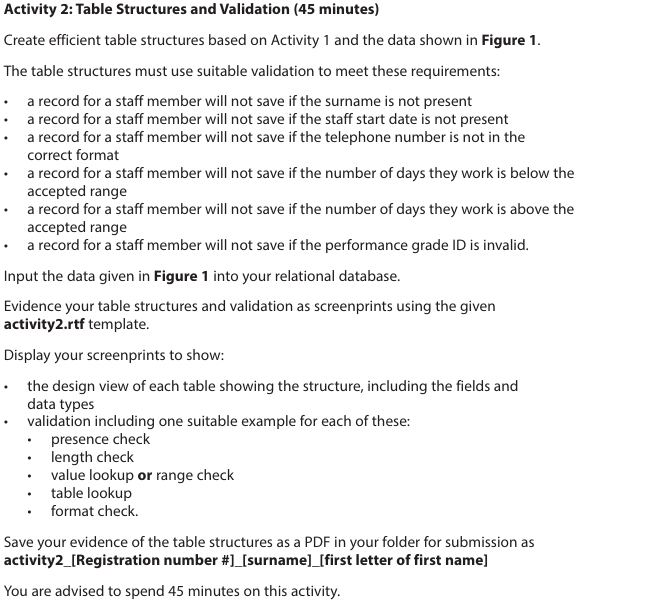
The key deliverables are within the bullet points of the task. These will link to the scenario that has been provided in the exam series.
Within most of the exam series the task will look to evidence the following
- presence checks
- length checks
- value lookup or range checks
- table lookups
- format checks.
This task will make use of the first of our provided templates. In this task you are ONLY required to provide screenshots of the application of these structures and validations.
What is a Presence Check?
The use of a presence check is to ensure that the user has entered a record in to the database table that is required. Consider the following example, a database table that is recording data about an employee within an organisation. The Employee my be given an employee id, but the next field with the name of the employee is blank. This will not be helpful for an organisation. So we can enfource a validation rule to ensure that this field cannot be left blank or NULL.
Consider the table structure below, we can see its structure and properties,
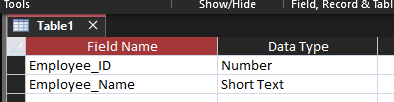
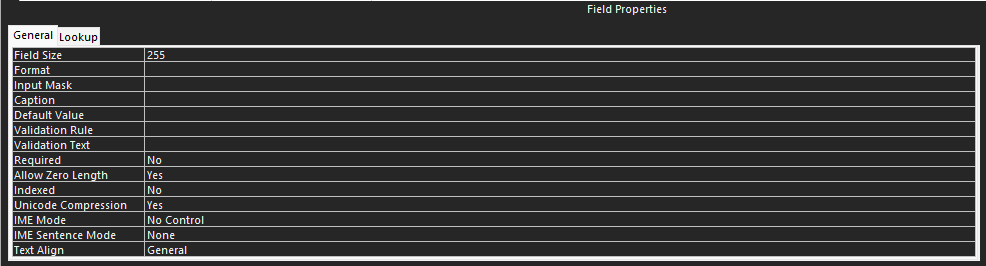
We can enforce our presence check by focussing on the validation area. Within this area we will need to input our requirement of the field not being blank or Null. The Rule is placed within the "Validation Rule" row within the field properties area. It is also important to include a message that is displayed to the use if this rule is not met, this is done in the "Validation Text" row. The example below demonstrates the use of Is Not Null as the rule command, and then an appropriate message back to the use if this isnt met (This message can be anything, but ensure that it is clear to the user)

What is a Lenght Check?
The use of a length check will allow the table to only accept values/data that is within the peramiters of the lenght. This can be a simple as only allowing 11 digits to be entered in to a phone number field.

What is a Value Lookup or Range Check?
What is a Table Lookup?
What is a Format Check?
Last Updated
2026-10-09 12:45:46
English and Maths
English
Maths
Stretch and Challenge
Stretch and Challenge
Homework
Homework
Equality and Diversity Calendar
How to's
How to's Coverage
Links to Learning Outcomes |
Links to Assessment Criteria |
|
|---|---|---|
Files that support this week
→
Next ←
Prev