Top
Week 12
2.26 Understand the purpose and applications of mobile device management (MDM) and be able to configure accessories and ports of mobile devices
Purpose:
o tracks and locates mobile devices
o secures mobile devices
o manages use of devices
o manages configurations:
– wireless data network
– cellular data network
– hotspot
– tethering
– airplane mode
– Bluetooth
– email accounts.
Remote management:
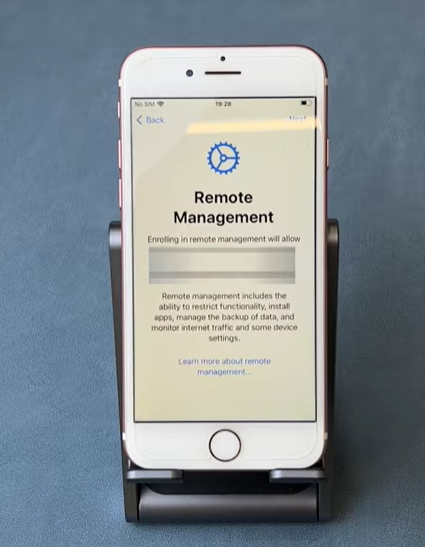
Remote wipe
Remote wipe allows an authorised administrator to delete data from a mobile device without physically accessing it.
It is normally used when a device is:
- Lost or stolen
- Not returned by an employee
- Believed to have been compromised
- No longer approved for organisational use
A full remote wipe may erase the entire device and return it to its factory settings. A selective wipe removes only organisational data, applications and user accounts while leaving personal information on the device.
For example, if an employee loses a tablet containing customer records, the IT department can remotely remove those records before an unauthorised person accesses them.
Remote wipe reduces the risk of:
- Data breaches
- Unauthorised system access
- Confidential information being copied
- Former employees retaining organisational data
However, remote wipe normally requires the device to connect to the internet before the command can be received.
Disabling functionalities
Disabling functionalities means preventing users from accessing certain device features.
An organisation may disable:
- The camera
- Screenshots
- Bluetooth file transfers
- USB connections
- Copying and pasting
- Mobile hotspots
- Location services
- Voice assistants
- Factory reset options
- Installation from unknown sources
The restrictions selected depend on how the device is being used.
For example, a healthcare organisation may disable screenshots and copying while staff are viewing patient records. A secure workplace may disable the camera to prevent employees from photographing confidential information.
Disabling unnecessary features reduces the number of ways data can be copied, transferred or exposed. However, organisations must avoid disabling functions that employees need to complete their work.
Restricts mobile devices
Restricting mobile devices means controlling which devices are allowed to access an organisation’s systems, networks and data.
An organisation may require devices to be:
- Registered with the IT department
- Enrolled in the MDM system
- Protected by a password or PIN
- Encrypted
- Fully updated
- Protected by automatic screen locking
- Using multi-factor authentication
- Free from unauthorised modifications
A device may be blocked if it is:
- Unknown or unregistered
- Rooted or jailbroken
- Running an outdated operating system
- Missing required security updates
- Reported as lost or stolen
- Not protected by an approved password
For example, an employee may be prevented from accessing work email from a personal phone that has not been approved by the organisation.
This helps prevent insecure or compromised devices from becoming an entry point into organisational systems.
Controls app store
Controlling the app store allows an organisation to decide which applications users can install and use.
The organisation may provide a managed app store containing only approved applications. It may also block:
- Games
- Social media apps
- File-sharing software
- Unapproved cloud storage
- Applications from unknown sources
- Apps with excessive permission requests
- Applications that have known security weaknesses
The IT department may also remotely:
- Install required applications
- Remove prohibited applications
- Apply application updates
- Purchase licences
- Configure application settings
- Remove an app when it is no longer needed
For example, delivery drivers may only be allowed to install route-planning, parcel-scanning and secure communication applications.
Controlling applications reduces the risk of malware, data leakage and inappropriate use. It also helps ensure that employees use compatible and properly licensed software.
Restricts calling/data use.
Restricting calling and data use allows an organisation to control how employees use calls, text messages, mobile data and roaming services.
The organisation may block or limit:
- Premium-rate numbers
- International calls
- Personal calls
- International roaming
- Video streaming
- Large downloads
- Mobile hotspot use
- Social media data use
- Data use outside working hours
MDM or mobile network management systems can also monitor usage and alert administrators when a device exceeds an agreed allowance.
For example, a company could prevent employees from using work phones to make premium-rate calls or stream films using the organisation’s mobile data plan.
These controls help to:
- Reduce unnecessary costs
- Prevent misuse
- Protect data allowances
- Identify unusual activity
- Reduce the risk of unexpected roaming charges
Restrictions should be explained clearly through an acceptable-use policy so employees understand what is and is not permitted.
Controls back-up and synchronisation.
Controlling backup and synchronisation determines where organisational data can be copied, stored and synchronised.
Mobile devices often automatically back up:
- Photographs
- Contacts
- Emails
- Documents
- Application data
- Passwords
- Device settings
Without suitable controls, work information could be copied to an employee’s personal cloud account, such as personal Google Drive, iCloud, Dropbox or OneDrive storage.
An organisation may therefore:
- Disable personal cloud backups
- Require backups to use approved organisational storage
- Encrypt backed-up information
- Prevent work files from synchronising with personal devices
- Separate personal and organisational data
- Automatically remove local copies after secure synchronisation
- Control which applications can access backed-up information
For example, photographs taken as evidence of a completed delivery may be synchronised to the organisation’s secure server but blocked from uploading to the employee’s personal photo account.
These controls help prevent confidential information from being stored in unauthorised locations. They also ensure that important organisational data is backed up and can be recovered if a device is lost, damaged or replaced.
Using the 4 case studies below, reflect on the situations experienced in each and answer the questions provided at the bottom of the documents.
Remote management done well
Case Study 1 Riverside Community Healthcare Trust
Case Study 2 BrightRoute National Delivery Services
Remote management done not so well
Case Study 1 Westbridge Care Services Data Breach
Case Study 2 NorthLine Engineering Ransomware and Financial Loss
Security:
o screen lock
o encrypts device
o password enforcement
o failed login attempts/login restrictions
o multi-factor authentication.
Applications:
Segregation:
– multiple profile options for personal and professional use
– management of application data
– compliance with organisational policies and procedures.
Authenticator applications (for example, Google authentication, fast identity online (FIDO)).
There are many authentications applications available to users, Lenovo discuss the purposes of and how authenticator apps work. Using the provided document research and complete the questions.
Research Activity- Authenticator Apps and Two-Factor Authentication
Apply mobile device management (MDM) to configure mobiledevices to allow:
o wireless data networks
o cellular data networks
o hotspots
o tethering
o airplane mode
o Bluetooth
o email accounts.
2.27 Be able to explain the application and benefits of digital solutions to meet specific requirements
• Analyse requirements:
o access to information, services or products
o conducting transactions.
• Identify the best application of digital solutions to meet requirements:
o digital systems (for example, content management systems)
o productivity software
o digital technologies.
• Explain the benefits of applying the identified digital solution:
o express ideas clearly and concisely
o use appropriate level of detail to reflect audience requirements
o use technical terminology.
2.28 Be able to operate digital information systems and tools to maintain information and delivery of a digital support service
• Operate information systems to collect, store, maintain and distribute information to support service delivery.
• Process and review user feedback data on service:
o critically analyse validity of user feedback.
• Maintain service delivery and information:
o create, action and update tickets
o communicate the status of tickets with users
o monitor and record system performance
o support users remotely by utilising remote support software.
• Record and summarise all relevant findings and actions to inform future policies and procedures:
o logically organise all findings
o using appropriate technical terms.
Using the link to the simulation below, review some of the job tickets and reflect on the feedback provided to discuss in groups the effectiveness of the information recorded and the benefits and drawbacks of using these types of systems.
ServiceDesk Pro - IT Help Desk Simulation
2.29 Understand the methods and tools used to train others in using digital systems and technologies, and the appropriate applications of these methods and tools
• Methods:
o shadowing
o desk side
o remote support
o e-learning
Using the link below work through the e-learning course about Data Protection.
Course: UK Data Protection Interactive SCORM | MSSMoodle
o VR
o AR
o smart boards
o applications (for example Kahoot!, Padlet)
o simulation.
• Tools:
o crib sheets
o smart sheets
o webinars
o screencasts
o managed learning environments (MLE)
o virtual learning environments (VLE)
o sandboxed environments
o MOOCs.
Last Updated
2026-07-14 13:45:21
English and Maths
English
Maths
Stretch and Challenge
Stretch and Challenge
Homework
Homework
Equality and Diversity Calendar
How to's
How to's Coverage
Links to Learning Outcomes |
Links to Assessment Criteria |
|
|---|---|---|
Files that support this week
→
Next ←
Prev